Rebirth becomes available when the game marks you eligible. Open the Rebirth panel, read the trade carefully, and check the new values after you confirm. Exact requirements and multiplier values can change, so the live panel beats an old screenshot every time.
Reach the current level cap and open Rebirth
Build Power and level through the normal game loop first. For training, dungeons, Wins, heroes, pets, and Worlds, the +1 Superhero Evolution beginner guide covers the earlier progression.
- Train for levels: Keep building Power until the Rebirth menu shows its current level threshold as complete.
- Open Rebirth: Use the Rebirth option in the game UI.
- Read the preview: Check the requirement, the benefit, and the reset warning.
- Confirm only when eligible: Use the value shown in your own panel, not a number copied from an older screenshot.
Read the reset warning before you confirm
Rebirth is a reset-for-growth trade. The panel warns that your current Power and level reset. It also previews a higher level cap and a Power-gain multiplier for the next stage of progression.
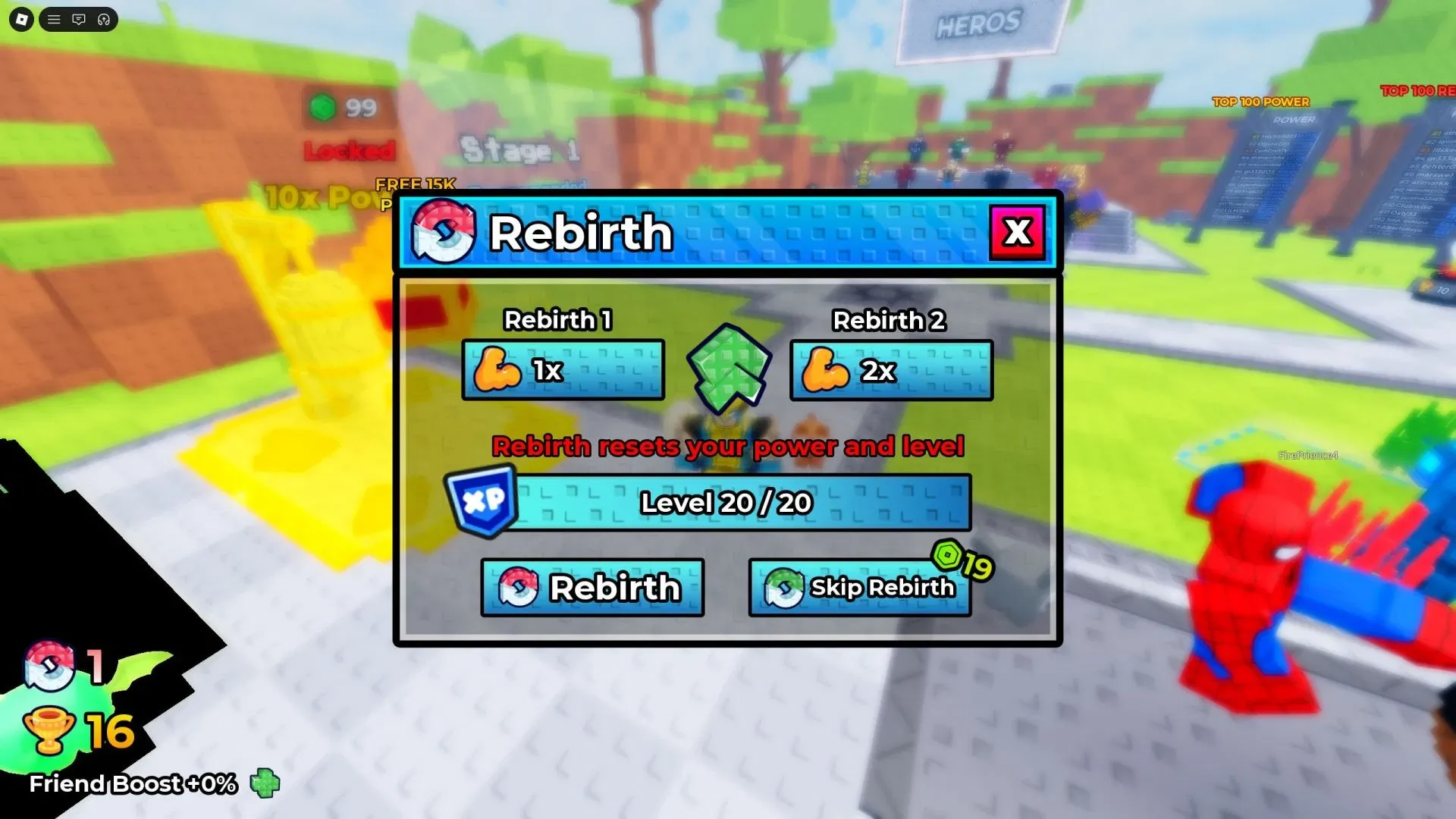
The level and multiplier visible in the screenshot are examples from that capture, not a permanent table. The warning names Power and level as resets, but it does not give a universal rule for Wins, heroes, pets, Worlds, upgrades, or passes. Read the full prompt before assuming any of those reset or stay.
When the requirement is complete and you accept the trade, choose the Rebirth control instead of Skip Rebirth. That button is not decorative, even if it looks very polite about waiting.
Check the new cap and multiplier after Rebirth
Make a short before-and-after note so you can see what changed instead of relying on memory. Record these points:
- Your current Power and level.
- The visible Power per click and click rate.
- Your equipped hero and pets.
- Your Wins and current World.
- The complete Rebirth requirement, benefit, and reset warning.
- After confirming, the Rebirth count, new level cap, and displayed Power-gain multiplier.
- A short Power test using the same setup as before.
Use the same hero, pets, area, and click method for both tests where possible. Change one variable at a time, so the comparison tells you something useful.
Do not use a fixed number of levels or Power as your timing rule, because the live requirement can change. Confirm when the panel says you are eligible and you are ready to lose the current Power and level. For a wider look at the reset decision, the Greedy Growers Rebirth breakdown gives useful Roblox context, but the panel in +1 Superhero Evolution decides the exact requirement here.