Rebirth turns your current Greedy Growers run into permanent progression, but it removes two resources: Cash and Seeds. Open the live menu before you tap the button, because costs and unlock order can change after updates.
Open the Rebirth menu and read what it will reset
Rebirth is a soft reset, not a full wipe. Previously unlocked features and items remain available, while Cash and Seeds are consumed. The Cash requirement applies to that Rebirth level, not to a cumulative total.
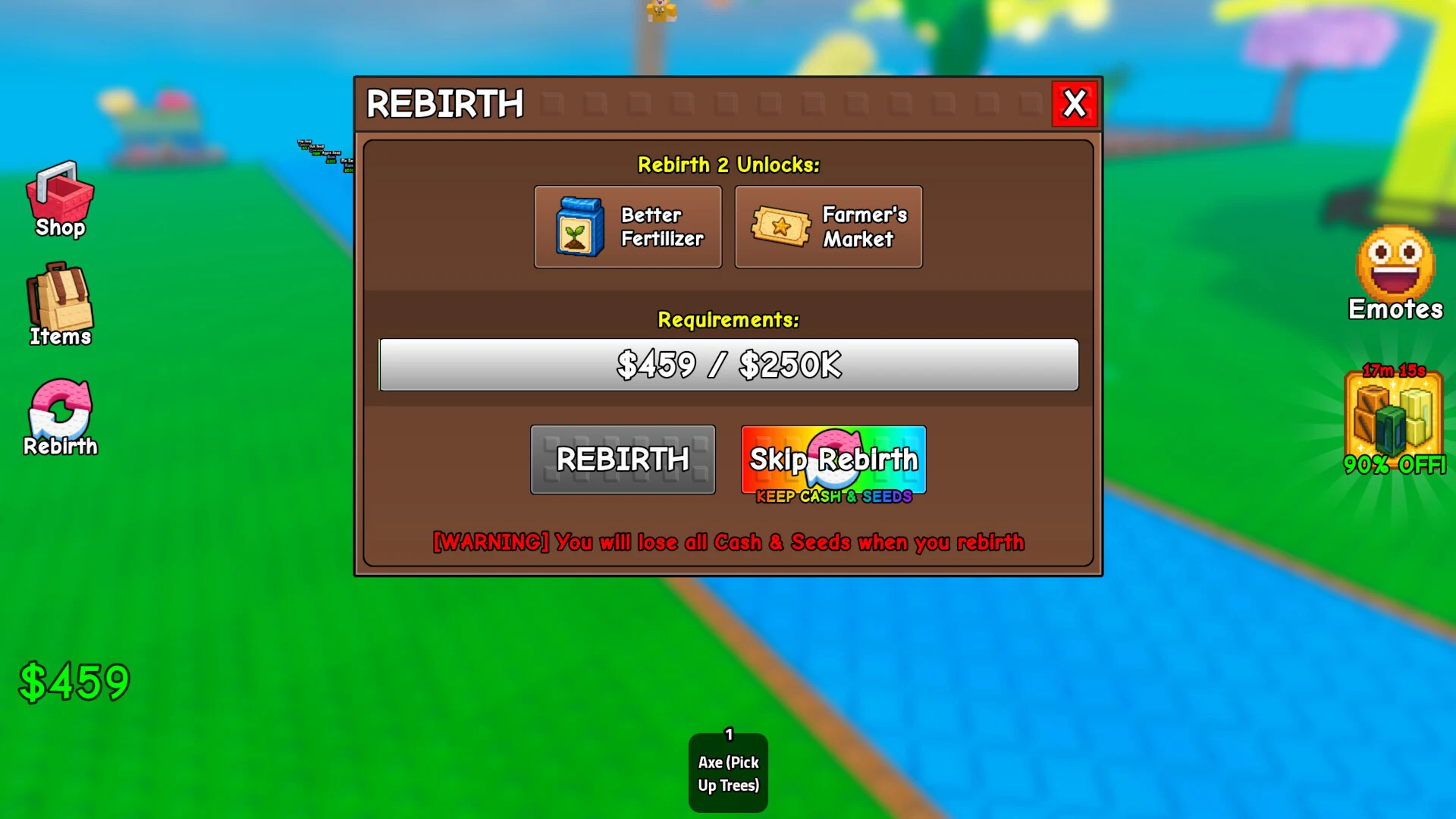
Use the menu in this order:
- Earn the displayed Cash amount. Treat the number in your panel as the target.
- Open the Rebirth control on the left. It opens the menu for your next reset.
- Read the requirement and unlocks. Check what the current reset offers instead of using an old reward order.
- Read the warning. It tells you what the current build will remove.
- Confirm Rebirth when ready. The action happens from this menu, so take a moment before tapping.
These are the upgrades tied to Rebirth
The systems named in the Rebirth progression include:
- Farmer's Market
- Wheel Spin
- Worm Shop
- Pet Shop
- New fertilizer types
- Tickets
- Larger farm size
Your menu is the live reward list. Keep the broad list above as a map, not as a fixed level table. If an update moves an unlock or changes a cost, the current panel wins.
If Pet Shop is already on your unlock path, the Majestic Egg guide can help with the pet goal that follows.
Prepare before pressing the button
Treat the confirmation screen as your final check. A short pause can save you from starting the rebuild without the resources you expected.
- Note the live requirement. Do not farm towards an old Rebirth ladder when the menu gives you the current target.
- Finish current-run decisions. Make any sale, harvest, or planting choice you want before confirming the reset.
- Check unlisted progress. The warning confirms that Cash and Seeds are consumed, but it does not define every category. Do not assume planted trees, fruit, pets, Tickets, or other inventory survive unless the current screen says so.
- Plan the rebuild. After Rebirth, return to the river-to-plot loop, grow your crops, and harvest before lightning. The seed costs, rarities, and spawn chances guide helps you choose seeds for the new run.
The safest rule is simple: trust the Rebirth panel in front of you, then confirm only when the loss and the next unlock both make sense for your run.