Promotions let you turn duplicate Chickens into permanent combat-stat improvements for a Chicken you plan to keep. Open the target through Flock, use its Promote menu, and trust the live panel for the required copies. Update 3 added this long-term upgrade, so spare copies now need a little more thought before you spend them.
How to promote a chicken in Grow a Chicken Fighter
Use copies of the same Chicken as the target. The panel shows the current requirement before you commit anything.
- Open Flock. Find the menu that lists your Chickens.
- Choose the target. Select the Chicken that should receive the Promotion. Pick the copy you intend to keep, not a temporary placeholder.
- Open Promote. Switch to the target's Promote tab or menu. This opens the Promote Chicken panel.
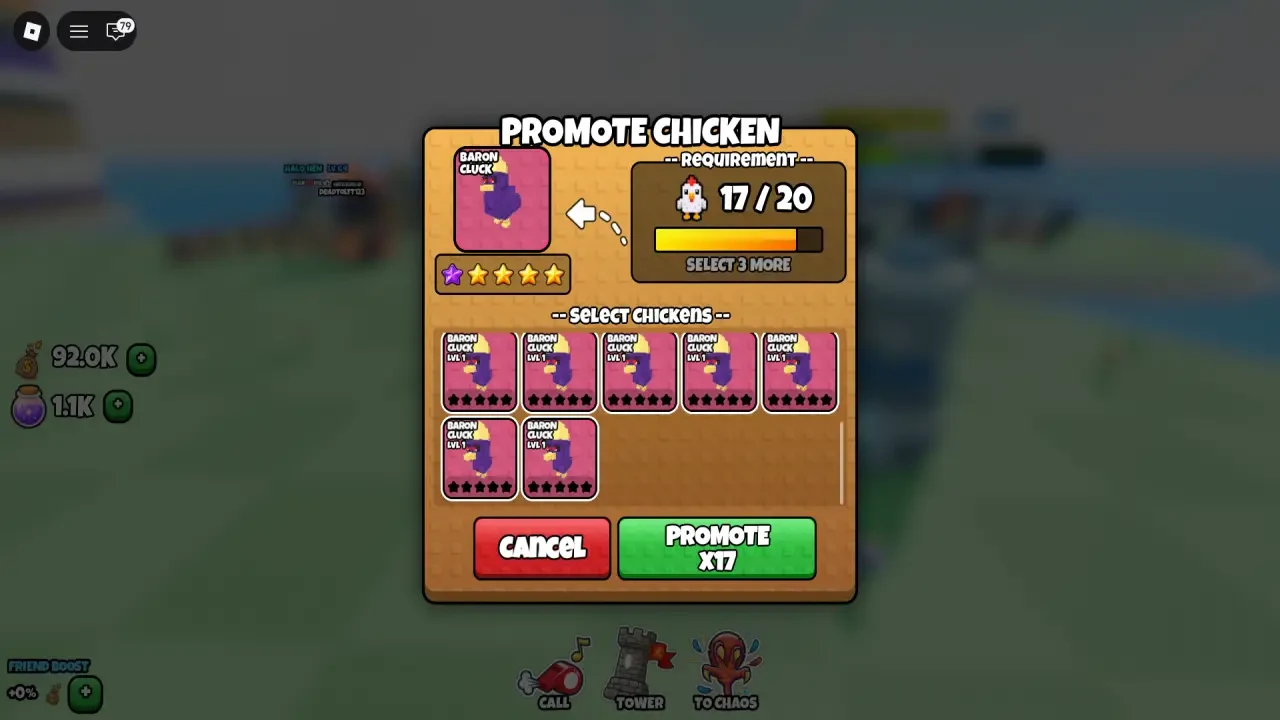
- Select duplicates. Add the required copies of that same Chicken. Use the counter in the panel instead of guessing the number.
- Check and confirm. Inspect the target, selected copies, and Promotion preview. When the selection is correct, press the green Promote button.
What the duplicate requirement and Promotion star mean
Promotion uses duplicate copies of the selected Chicken to improve the target permanently. It is a long-term upgrade, so the copy you spend can matter more than its current level.
After each Promotion, the required duplicate count increases. The panel shows the number for that target and stage, so use it instead of a fixed cost ladder.
After a successful Promotion, the target shows a star. The boost is a permanent combat-stat improvement, but do not assume a fixed percentage or a complete stat list. Read the preview for the exact result your panel offers.
Which Chicken should you promote first?
Start with a Chicken that has a role you still expect to need. A long-term PIT, TOWER, or Arena fighter is a safer target than a Chicken you are about to replace.
- Choose the keeper first. Pick the copy you expect to use through several progression steps. Its level alone should not decide the target.
- Compare the copies before spending one. Check each copy's level, mutation, genetics, and Special. Keep the copy with the role and traits you want, then select only weaker or replaceable duplicates.
- Check other jobs. A duplicate may be needed as a Fusion donor or for an egg route. Check the Fusion guide before spending a copy that has donor value.
- Protect valuable copies. Mark irreplaceable Chickens as Favorite where the option is available, then review the selected-copy list anyway. That final check can save a useful donor from an unfortunate click.
- Match the build to combat. Use the Chicken tier list for target ideas, then check how the Chicken fits your own PIT, TOWER, or Arena plan.
FAQs
Where is the Promote button?
Open Flock, select a Chicken, and open its Promote tab or menu. The green Promote button is inside that panel after you select the required copies.
How many duplicate Chickens do I need?
The panel gives the live number, and the requirement rises after each Promotion. One Doll Hen example uses one duplicate for the first Promotion and two for the second, so do not apply that ladder to every Chicken.
How many times can I promote a Chicken?
Do not plan around a fixed cap yet. Promotion details currently show both five Promotions and a ten-star track, so check the target's live star row and next requirement instead of planning around either number.
Should I promote a Chicken I plan to fuse?
Only do it after checking the Fusion preview and deciding that the duplicate can be spared. Promotion and Fusion both compete for copies, so compare your donor options before confirming.