Keeping duplicate troops can feel wasteful when your collection fills up, but those repeats are the material Ascension uses. In Command An Army, you merge two copies of the same unit at the same Ascension tier to produce one unit at the next tier. This guide covers where the tree is, which pairs are eligible, how many base copies each tier represents, and what the upgrade changes. For broader lobby and early-control help, the Command An Army beginner's guide covers the setup, while the steps below stay focused on Ascension.
What Is Ascension in Command An Army?
Ascension is a duplicate-fusion mechanic that turns two eligible copies into one stronger survivor. The important restriction is exact tier matching: an unascended unit cannot merge with its Ascension 1 version, and an Ascension 1 unit cannot be paired with a higher-tier copy. Both slots need the same unit at the same Ascension tier.
That makes duplicate management part of your upgrade plan. Instead of deleting every repeat as soon as it enters your collection, keep copies of units you may want to build and decide which ones are worth combining.
Command An Army Ascension Levels and Duplicate Requirements
Each step uses two copies of the immediately previous tier. If you are planning from base units, the progression works out like this:
| Result | Copies you merge | Base copies needed |
|---|---|---|
| Ascension 1 | 2 base units | 2 |
| Ascension 2 | 2 Ascension 1 units | 4 |
| Ascension 3 | 2 Ascension 2 units | 8 |
The last column is planning math from the two-for-one merge rule, not a separate displayed resource price. For example, reaching Ascension 2 means making two Ascension 1 units first, which consumes four base copies in total. The reported maximum is Ascension 3, so an Ascension 3 unit is the endpoint shown in this progression. If a later update changes that limit, use the tier displayed in the Ascension menu.
A same-name duplicate at the wrong tier still cannot fill the second slot. Make the tier check before you start the merge so you do not waste time looking for a combination the menu will reject.
Where to Find the Ascension Tree in Command An Army
After your avatar spawns in the lobby, head toward the large tree with blue leaves near and opposite the Summons area. It is the glowing-blue landmark used for Ascension. On PC, press E when you reach the tree to open its interaction menu.
How to Ascend a Unit in Command An Army
The Ascension menu gives you two duplicate slots and a result preview. Use the individual slots when you want to control exactly which copies are merged.
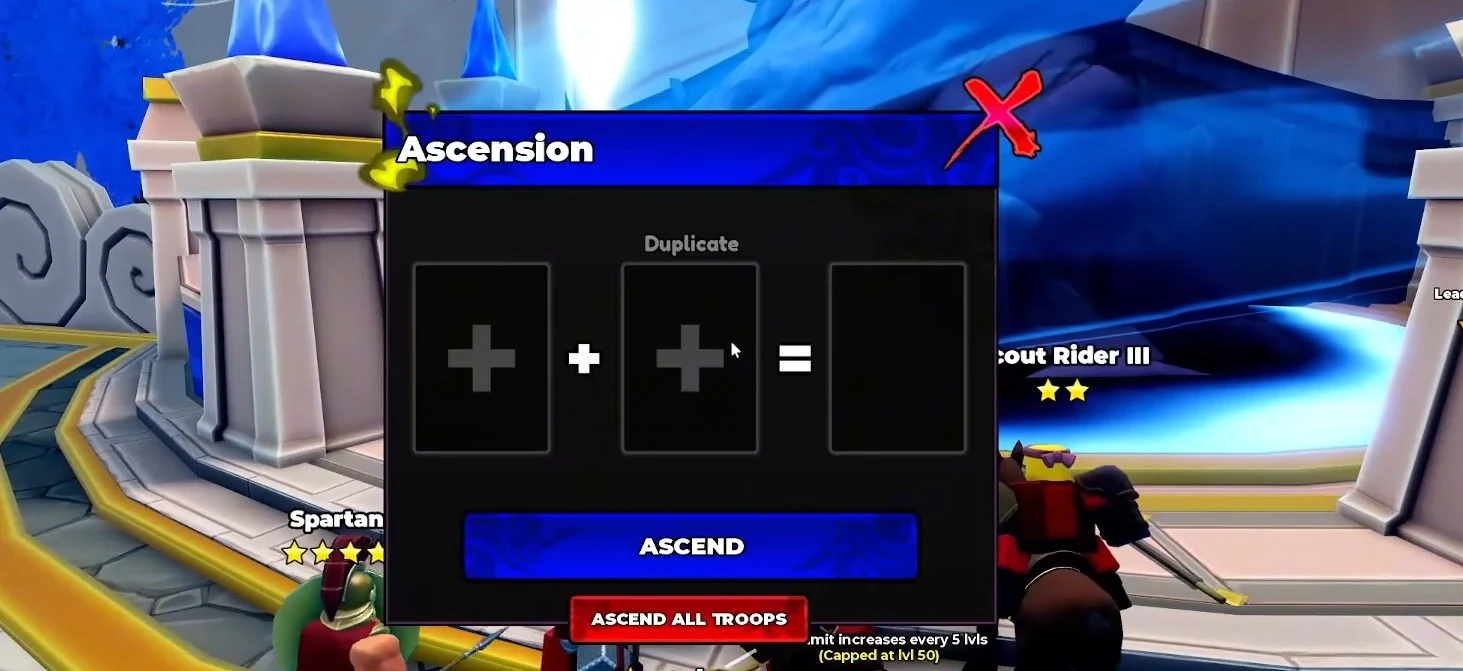
- Walk to the blue-leaf Ascension Tree and press E on PC to open the menu.
- Select the + icon in the first slot, then choose the unit you want to upgrade.
- Select the second slot and choose another copy of the same unit at the same Ascension tier.
- Check the pair and the result preview. If the second copy is missing or cannot be selected, verify the unit name and tier before continuing.
- Press Ascend to confirm the merge. One duplicate is consumed, and one survivor advances to the next Ascension tier.
- To ascend that unit again, repeat the process with two copies at its new tier. A base unit cannot substitute for one of those higher-tier copies.
What Changes After Ascension in Command An Army?
A normal Ascension increases the unit's health, damage, and rush damage. Its speed and range do not change, so Ascension makes the same troop stronger without changing those parts of its combat profile.
Ascension does not require Gems. The duplicate you merge is the real cost, which is why it is useful to keep extra copies until you are sure which unit belongs in your main lineup. Spend the merge on a troop you plan to keep using rather than treating Ascension as a quick way to clear collection space.
Ascension vs Mastery and Evolution in Command An Army
Ascension and Evolution are separate progression systems. Ascension is the duplicate merge performed at the tree, while Mastery is a separate progression track. Mastery level 20 unlocks Evolution, so that milestone belongs to the Evolution path and should not be treated as an Ascension requirement.
If your goal is to improve a troop through Ascension, focus first on collecting matching copies at the same tier. Continue building Mastery separately when you are working toward Evolution.
Command An Army Ascension Mistakes to Avoid
- Pairing different tiers: Two copies with the same name are not enough if one is base and the other is already ascended. Both must show the same Ascension tier.
- Deleting useful duplicates: Base copies are needed to build higher tiers, so keep repeats of units you may want to strengthen.
- Expecting more speed or range: Ascension raises health, damage, and rush damage, but it does not change speed or range.
- Using a bulk action without checking your collection: The menu also includes an Ascend All Troops option tied to a Robux game pass. If preserving specific copies matters, use the individual slots and review the pair before confirming.
After a successful merge, keep building the surviving unit and save the next matching pair for another tier. If the Ascend button will not accept a combination, check the unit identity and Ascension tier first rather than trying to force a mixed-tier merge.