Command An Army gives you two jobs at once: direct an army and fight as its commander. Your class controls the commander's weapon and personal combat rhythm, not the troops you recruit. Switching from Sword & Shield to Assassin will not change your troop roster, Star Limit, or the orders you issue.
This guide compares the three personal classes, explains what each one is good at, and covers the reported cost of changing your choice later.
What Classes Change in Command An Army?
Command An Army matches revolve around recruiting troops, capturing points, choosing Attack or Defend, issuing formations and orders, and upgrading your units. Your class sits on top of that army system as a separate personal combat layer. It changes how your avatar fights alongside the troops, but it does not add, remove, or upgrade a troop for you.
You choose a class during the opening tutorial. The three options are Assassin, Sword & Shield, and Hammer, and the tutorial choice is free. Later class changes use Gems, so it is worth choosing a combat rhythm you actually enjoy before you spend the currency.
That separation also explains what a class cannot fix. An Assassin cannot replace a frontline troop, Sword & Shield does not add a Shieldman to your roster, and Hammer does not solve a missing ranged role or an over-cap loadout. For the broader first-match systems, including starter troops, controls, and Star Limit advice, see the Command An Army beginner's guide.
Command An Army Classes Compared
Use the class role as your starting point instead of looking for one class that is best in every battle. Your army can create opportunities for a class, but your personal choice still determines how you contribute when you step into the fight.
| Class | What it changes | Best fit | Main tradeoff |
|---|---|---|---|
| Sword & Shield | A defensive, balanced frontline style built around blocking and counterattacking | Players who want protection while learning the battle rhythm | Less focused on quick flanks, and it still does not replace a frontline troop |
| Assassin | Quick personal pressure with dual daggers and opportunities to attack exposed targets | Players who like active positioning and have troops that can occupy the enemy | Lower protection and shorter reach make mistimed entries dangerous |
| Hammer | Heavy damage per hit with a slower, more deliberate swing rhythm | Players who prefer committed aggression and careful timing | Missed or poorly timed swings leave you vulnerable, especially under ranged fire |
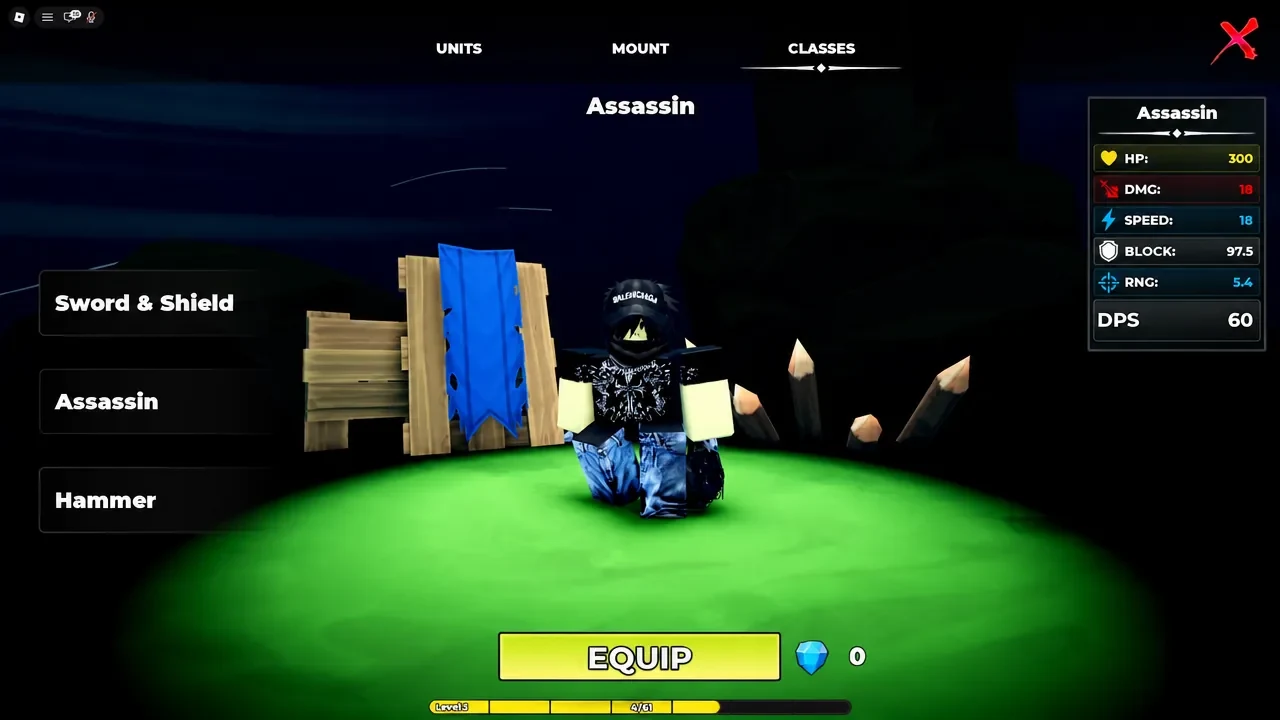
The Classes menu shows all three choices and the selected class's equip control, so use that card to check the wording and price shown on your account before confirming a purchase or change.
Sword & Shield in Command An Army
Sword & Shield is the most forgiving option if you want your commander to hold space near the fight. The shield lets you block attacks, while the sword gives you a way to counterattack instead of relying on your troops to handle every enemy who reaches the frontline. That defensive balance is why it is commonly recommended as the safest starting choice.
Choose it when you want time to learn when to advance, protect nearby units, and stay involved in a contested point without committing to a fragile flank. It can also complement an army with ranged troops that need someone to help keep pressure away from them.
The important limit is that this protection applies only to your avatar. It does not summon a Shieldman, increase your Star Limit, or make your other troops tougher. You still need a real troop formation behind the commander, especially when the opposing army brings enough pressure to surround you.
Assassin in Command An Army
Assassin is built for quick personal pressure rather than standing in the middle of every clash. Its dual daggers and quick swings suit players who watch for an opening, move around the main engagement, and pressure exposed ranged troops or another vulnerable target.
The class works best when one of your frontline or foot troops is already occupying the enemy. That distraction gives you a chance to approach from the side or rear instead of trying to force your way through the strongest part of the opposing formation. The class's job is to exploit an opening, not to create a safe frontline by itself.
That payoff comes with less protection and shorter reach. If you enter before the enemy is committed, or stay in the open after the flank fails, you can be punished quickly. Treat Assassin as a positioning choice, and let your army create the time you need to make the next strike.
Hammer in Command An Army
Hammer is the choice for a slower, more deliberate form of aggression. Its large weapon is built around heavy hits, so the class rewards choosing a moment and landing the swing rather than attacking continuously without regard for your spacing.
Use your troops to create room, then step in when the enemy cannot immediately surround you. A missed swing costs more when the recovery is slow, and clear ranged fire makes an overly direct charge risky. If you like leading from the front and are comfortable waiting for a clean opening, Hammer can make that commitment feel worthwhile without needing to be the best class for every player.
Which Command An Army Class Should You Pick?
Pick from the way you want your commander to participate, not from a universal tier list:
- Choose Sword & Shield if you want blocking, a steadier frontline rhythm, and the safest learning curve.
- Choose Assassin if you enjoy active flanking, quick pressure, and waiting for your troops to pin an enemy in place.
- Choose Hammer if you prefer deliberate, aggressive hits and are willing to manage the risk of a slower swing.
Your troop choices can complement any of these options, but they do not force you into one class. A foot-heavy army can make Assassin's flanks easier to set up, ranged units can benefit from a commander who helps protect space, and a solid formation can give Hammer time to swing. None of those pairings replaces the need to build and command the army itself.
If you are completely new, start with Sword & Shield and learn the point, order, and formation systems before spending Gems. Switch later only when you know you want more personal pressure or heavier hits.
How to Change Classes in Command An Army
When you decide to try another style, use the in-game Classes menu:
- Open the Classes menu.
- Select the class you want to try.
- Check the class card for the current Gem price, then use the EQUIP control to confirm the change.
Changing classes later is reported to cost 50 Gems. Treat that as an opportunity cost against a summon, not as a reason to assume every class's first-time unlock price is also 50 Gems. The first-time purchase wording and the later switch fee are separate decisions, so use the amount shown on the current class card before spending.
The best time to change is after you have learned what feels wrong about your current choice. If you keep getting caught while trying to flank, Sword & Shield may solve a protection problem. If blocking feels too passive, Assassin or Hammer may better match how you want to approach the fight. For everything around that choice, including troop loadouts and keybinds, return to the beginner guide.