Open Roblox Account Status while signed in. It shows your overall moderation standing, recent violations, active timeouts when present, and general safety tips. Opening or refreshing it does not add a violation, trigger a review, or change your record.
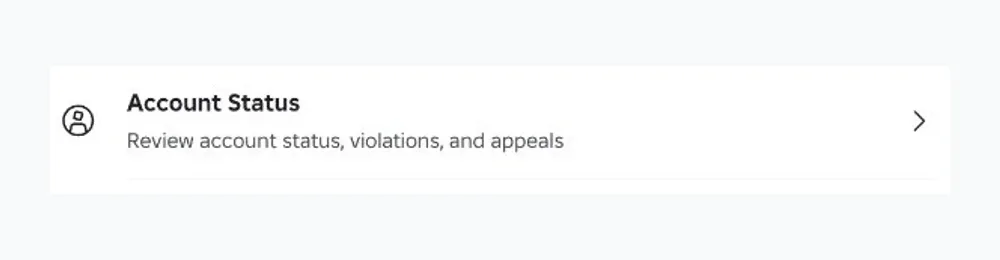
On desktop, the current shortcut is gear icon → Help and Safety → Account Status. Help and Safety is an item in the gear menu, not a page inside Settings. If your account does not show that shortcut, use the direct URL above.
How to open Roblox Account Status
- Sign in to the Roblox account you want to check.
- Open the direct Account Status URL above.
- If Roblox sends you to login, sign in within that same browser and reopen the URL.
The Roblox app and a separate browser may use different login sessions. Being signed in to the app does not always sign you in on the website.
You can also use the desktop menu when the shortcut appears:
- Select the gear icon near the top-right corner.
- Choose Help and Safety from the dropdown.
- Select Account Status.
A missing menu item or blank signed-in dashboard gives you no reliable answer about your standing. If Roblox already sent you a moderation notice, keep it and follow the appeal route named in that notice.
What the Account Status meter and violations mean
The dashboard separates overall standing from individual actions. Read the sections separately.
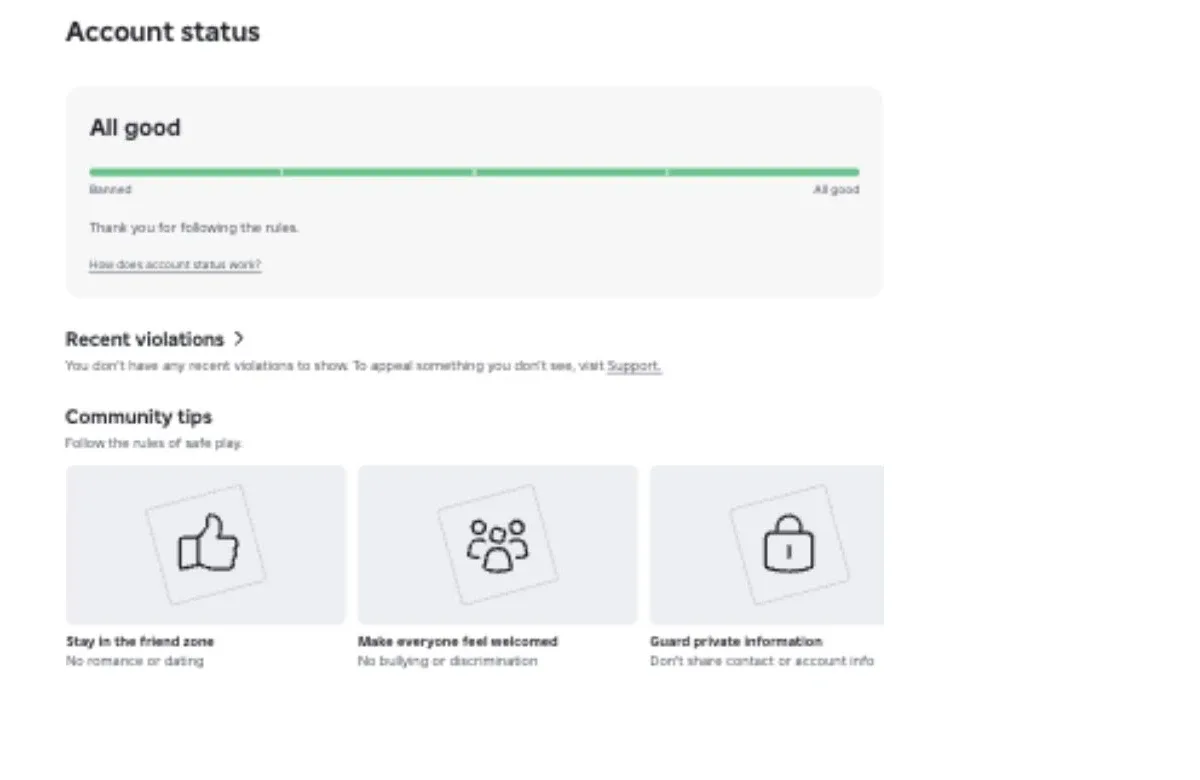
| Dashboard item | What it tells you | What it does not prove |
|---|---|---|
| Account status meter | A broad view of moderation standing, with observed labels such as All good and Critical | A strike count, exact formula, guaranteed next action, or complete label list |
| Recent violations | Actions Roblox currently lists, including details such as the affected surface, date, and appeal result | A complete lifetime history |
| Current timeouts | An active restriction and its remaining time, when this section appears | What consequence could happen later |
| Community tips | General reminders about following Roblox rules safely | A personalized warning or accusation |
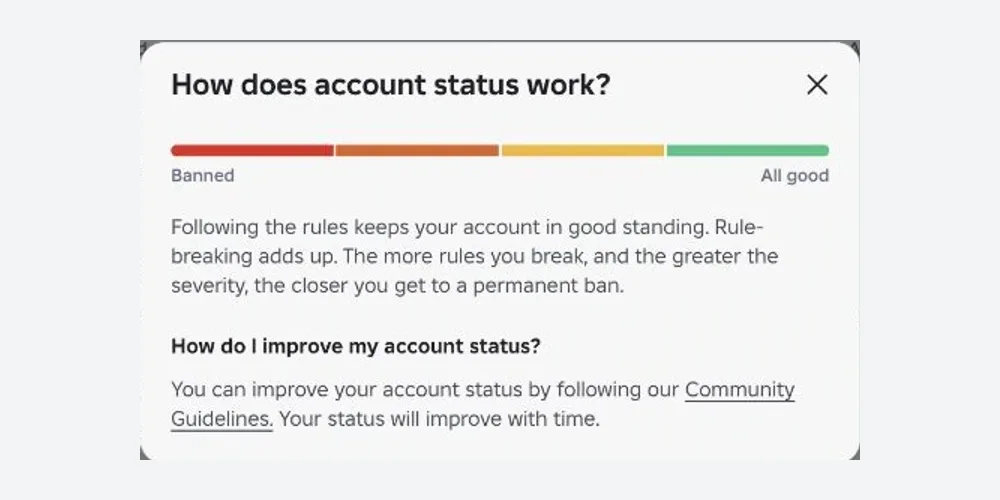
Roblox says violations can add up. Severity, impact, account history, and repeated rule-breaking can lead to stronger actions. Reviews may use automated systems, human reviewers, or both.
Roblox also says standing can improve with time when you follow its rules, but it publishes no meter formula, segment threshold, or recovery schedule.
If the meter looks poor but Recent violations is empty
The meter summarizes standing, while Recent violations covers a limited recent view. Roblox does not publish that history window, so the mismatch alone cannot identify the cause or predict the next action.
An empty Recent violations section means there is nothing recent to show there. It is not a lifetime clean-history certificate. A violation card may also show Appeal accepted, which means Roblox approved the appeal for that specific action.
Community tips are general policy lessons. Everyone may see topics such as friendly conversations or avoiding dating behavior, so treat them as education rather than account-specific notices.
How long Roblox moderation actions can last
These are action lengths shown in official examples and community reports. They are not a published Roblox ladder, and an account is not guaranteed to receive them in this order.
| Action type | Observed length | What to check |
|---|---|---|
| Warning | No standard timer published | Read the notice and the rule category it names |
| Short timeout | Minutes; Roblox gives a 20-minute timeout as one official example | Check whether access has already returned before starting an appeal |
| Temporary suspension | Player notices commonly show 1, 3, or 7 days | Use the exact end time shown on your own notice |
| Account deletion or permanent ban | No automatic return time | Use the appeal route in the notice when the action is eligible |
Roblox says action duration varies. The violation itself, its severity and impact, account history, and repetition all matter. A 1-day suspension does not promise that every future action will be 3 days, and a 7-day suspension does not reveal a fixed countdown to deletion.
Account Status does not cover every Roblox restriction
Account Status is for platform actions taken by Roblox. A one-game ban, parental setting, age check, or privacy option belongs to a different system.
| Problem | Who controls it | Correct next step |
|---|---|---|
| Roblox warning, timeout, suspension, or content removal | Roblox | Check Account Status and the appeal method named in the moderation notice |
| Error 267 ban from one experience | That experience's creator | Follow the Roblox Error 267 steps and contact the creator |
| Experience unavailable because of account settings | Account owner or parent controls | Check content maturity and parental settings with the account-settings fix |
| Age verification problem | Roblox identity verification system | Use the age-verification troubleshooting steps |
| Online status visibility | Account privacy settings | Change visibility under Privacy and content restrictions |
How to appeal a Roblox moderation action
Start with the moderation notification. Roblox uses it to tell you whether the action belongs in Violations & Appeals or needs the Support form. Only the account owner may appeal, so use the affected account and a valid email address attached to it.
1. Read the moderation notice
Find the account or content action, when it happened, the reason Roblox gives, and the available appeal method. Save a screenshot for your own records if the notice may disappear.
2. Appeal a listed violation
Open Violations & Appeals, select the action, and use the appeal option shown. Explain briefly why the decision should be reviewed. If the result later says Appeal accepted, Roblox approved that specific appeal.
3. Use Support for an action that is not listed
Open the Roblox Support form when the moderation notice tells you to use Support or the action is unavailable in Violations & Appeals.
For an account appeal, include the username and a short reason for review. For a content appeal, also include the asset ID and a link to the affected Roblox content.
4. Appeal before the deadline
The standard deadline is 30 days from the moderation action. Users in the European Union have up to six months to appeal an initial moderation action.
Keep the explanation factual and include only context that helps the review. An appeal does not guarantee reversal, and Roblox says it will not review duplicate appeals after an action has already been reviewed.
Actions that do not change account standing
- Repeatedly opening or refreshing Account Status
- Clearing the Roblox cache or reinstalling the app
- Switching devices or using a VPN
- Buying an extension or account add-on
- Completing age verification only to move the meter
- Sending duplicate appeals after a review
Follow the Roblox Community Standards, and appeal a specific mistake through the route Roblox assigns to it.