Drive A Kukirin looks simple once you see the open roads, but your first useful step happens before you ride: claim the free starter scooter at the Dealership. After you spawn it, normal riding starts the Cash loop and gives you a way to work through quests, new scooters, customization, and optional police chases.
This Roblox experience is in early beta, so use the prompt and live Store or Quests panel in your build if a key, menu label, price, or quest value changes. Here is the practical first-session route.
What Is Drive A Kukirin on Roblox?
Drive A Kukirin is an open-world electric-scooter simulator from Gogos Games Studios. You can ride through the map, switch between first- and third-person views, perform wheelies and other stunts, and customize the scooters you buy. Its physics focus on details such as weight transfer, suspension, throttle feel, and balance, so learning to control one scooter is more useful than rushing straight into a difficult chase.
The game is free to play, and you do not need to buy a vehicle before your first ride. The Dealership and its Scooter Store are the starting point for the free scooter, while driving and quests provide the Cash you will use for later choices.
How to Start Drive A Kukirin and Claim Your First Scooter
Your avatar spawns near the Dealership, so you can get on the road without searching the entire map. Follow these steps:
- Go to the Dealership and open the Scooter Store.
- Find the free starter entry and claim it. You do not need Cash for this first scooter.
- Open the Garage and select Spawn for the scooter you just claimed.
- When it appears beside your avatar, use the current ride or interact prompt to get moving.
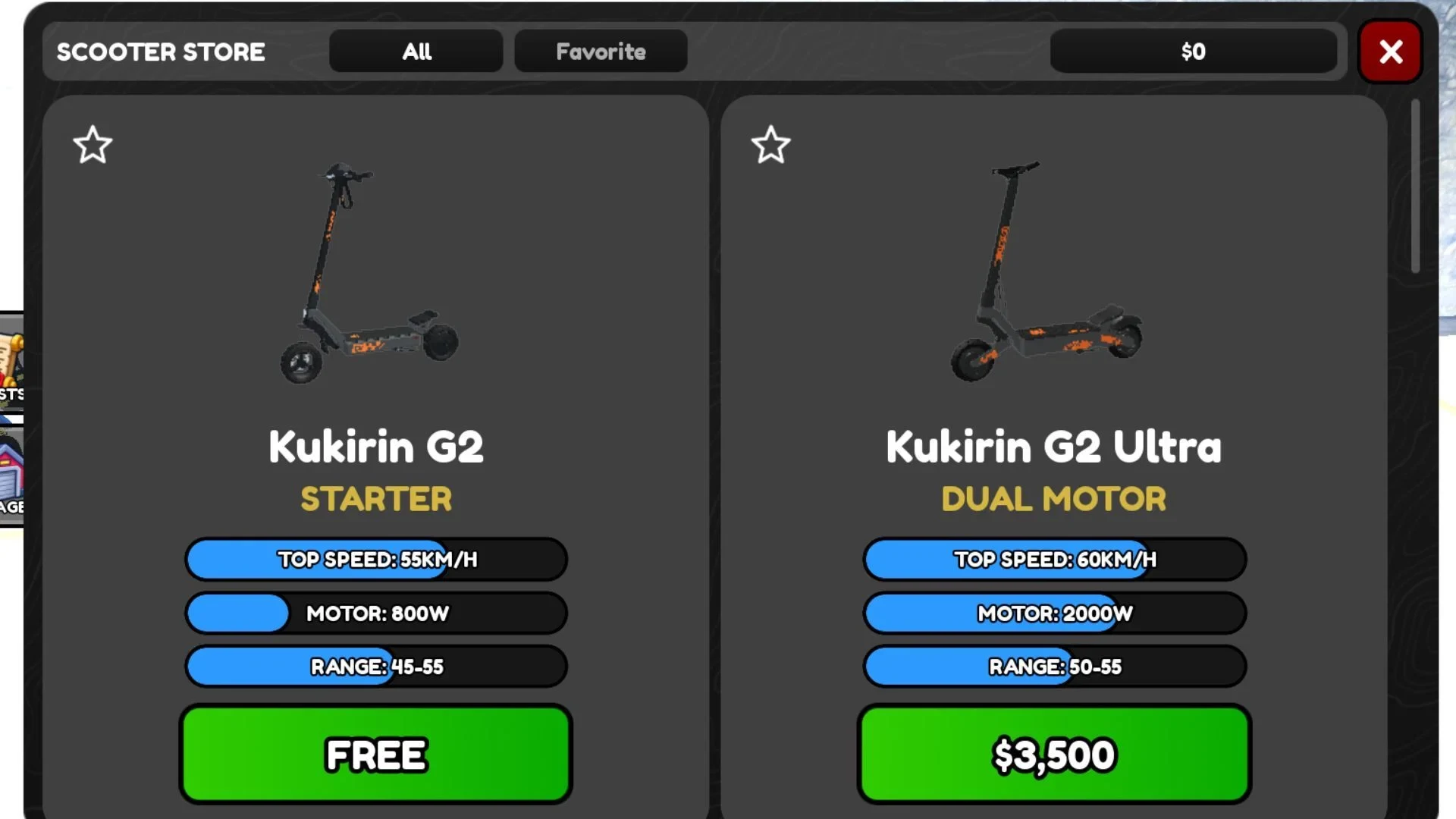
If the scooter does not appear, return to the Garage and check that the free entry is selected before using Spawn again. The exact model and displayed stats are not important for this first step; the useful result is owning a selectable starter ride.
Drive A Kukirin PC Controls and Your First Ride
On PC, these are the core controls you'll use most:
| Action | PC input | What it does |
|---|---|---|
| Move and steer | W, A, S, D or arrow keys | Controls movement and steering. |
| Jump or exit the vehicle | Spacebar | Jumps or gets you out of the scooter. |
| Interact | E | Interacts with stores and other available prompts. |
| Change camera | C | Switches between camera views, including first person and third person. |
| Toggle lights | L | Turns the scooter lights on or off. |
| Zoom in or out | I / O | Adjusts the camera zoom. |
Start with a clear stretch of road and test movement, turns, camera changes, and exiting before trying a stunt. The game’s balance-focused physics make small steering and throttle adjustments easier to learn when you are not also dealing with a chase.
How to Practice Wheelies Without Guessing a Key
Learn straight riding and controlled turns first, then use the wheelie prompt shown in your current build. Extra wheelie or riding-animation bindings can change while the game is in beta, so do not treat a key from an older guide as permanent.
Use small balance corrections instead of holding one direction for too long, and switch to a wider camera view if that makes the scooter easier to read. The goal of your first practice attempt is to understand how the scooter responds, not to hold a wheelie for a specific time.
How to Earn Cash in Drive A Kukirin
Simply riding generates Cash, and moving faster increases the rate. That means your starter scooter is already useful for progression: spawn it, keep riding, and let normal travel build your Cash balance while you learn the map.
The Quests panel gives that ride a second purpose. Distance and speed objectives can progress during ordinary movement, while stunt and wheelie objectives are better saved for after you are comfortable with steering. Police escapes also pay Cash, but they are an optional activity rather than a requirement for getting started.
Drive A Kukirin Daily and Weekly Quests
The quest system is split into three Daily assignments and three Weekly assignments. Daily tasks are a manageable way to add goals to a normal ride, while Weekly tasks are more demanding and can ask for longer driving, speed, stunts or wheelies, and Cash spending.
| Quest type | What to expect | What to do when it is complete |
|---|---|---|
| Daily | Three assignments covering goals such as distance, speed, stunts, wheelies, or spending Cash. | Open the completed row and use CLAIM if the button is shown. |
| Weekly | Three harder assignments that may require more driving, stunts or wheelies, or a Cash-spending goal. | Check the row for its completion state and a claim control before leaving the panel. |
Check the panel before you start a longer ride so you can choose a route and riding style that naturally works toward an objective. When the task is done, check the row rather than assuming the reward is collected automatically, since the visible claim control can depend on the current interface.
Drive A Kukirin Scooters and Customization
The Dealership sells additional e-scooters for Cash. A separate Shop can contain premium or Robux options, but the exact roster and prices are subject to change, so use the values displayed in your build instead of planning around an older model list.
The Customizations store is elsewhere in the open world. Interact with it, choose the scooter you want to change, and then select the available appearance or handling option. The supported customization categories include:
- Colors and stickers
- Grips and bars
- Suspension
- Brakes and discs
Customization purchases use Cash. Colors and stickers are cosmetic; parts such as grips, bars, suspension, brakes, and discs can affect the scooter’s speed, stability, or overall handling, so decide whether you want a visual change or a ride adjustment before spending your balance.
How Police Chases Work in Drive A Kukirin
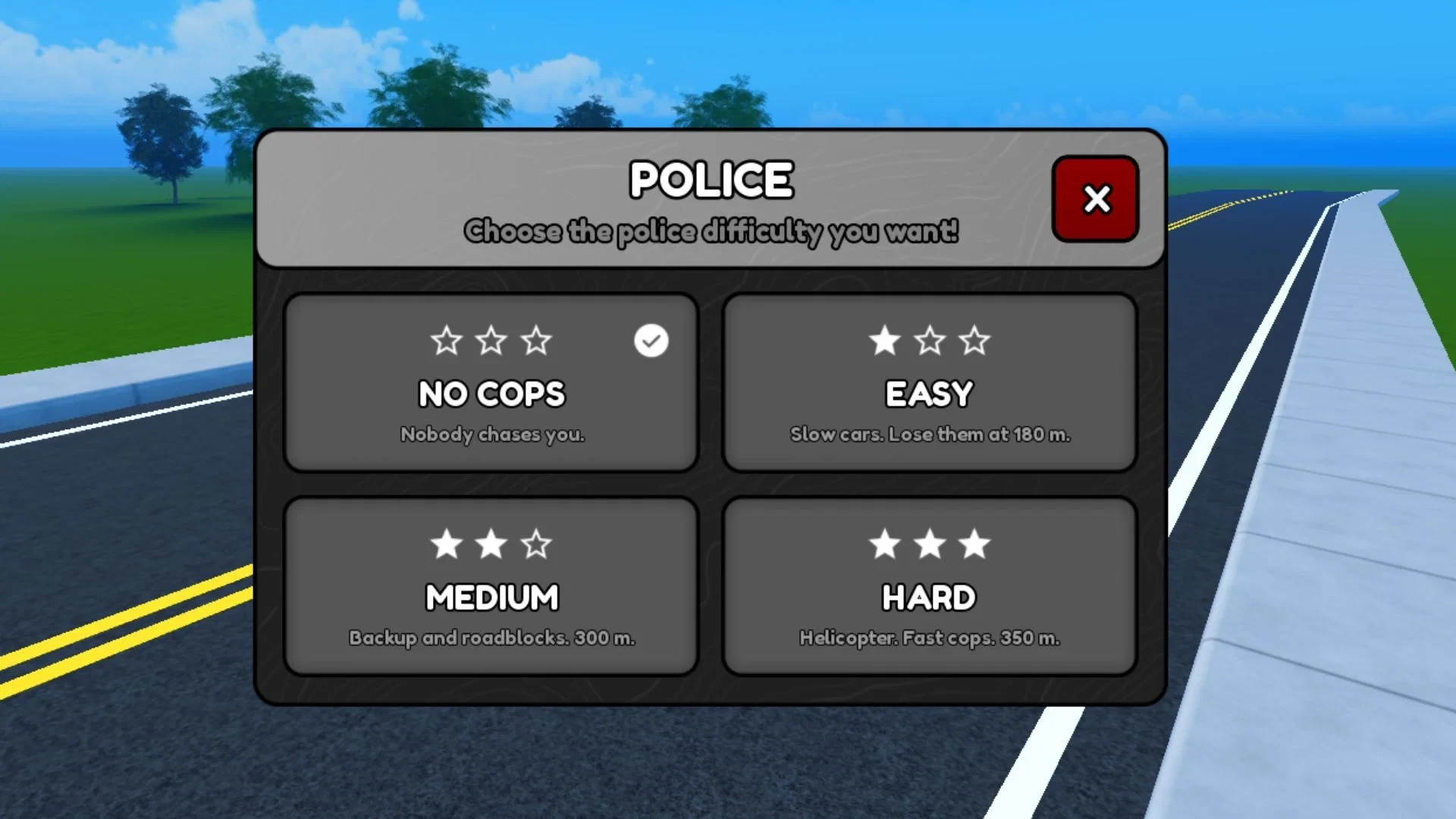
Once basic riding feels comfortable, open the police activity from the car icon at the top of the screen. Choose one of the four settings below, then create the listed distance to lose the pursuit:
| Setting | What changes | Escape distance |
|---|---|---|
| No Cops | No police cars chase you. | No chase to escape. |
| Easy | Police cars are slower. | 180 meters |
| Medium | Police cars are faster, with backups and roadblocks. | 300 meters |
| Hard | Police are faster and helicopters track you from above. | 350 meters |
Escaping a chase gives you Cash, and longer or harder pursuits pay more. For a first session, use No Cops while you practice, then try Easy once you can steer confidently. Medium and Hard add pressure through faster police, roadblocks, backups, or helicopters, so they make more sense after the normal riding controls feel familiar.
For the smoothest start, claim the free scooter, spawn it from the Garage, learn the core PC controls, and check the quest panel before a longer ride. Spend your first Cash on a scooter or customization choice that fits how you want to ride, and leave police chases as an optional way to earn more. If the beta shows a different key, menu label, or value, follow the live prompt or panel in front of you.