Anime Zero crafting is easiest when you choose the accessory first. Dungeon materials only help after you know the recipe you want, and the game gives you several ways to fill the list. This guide covers all 14 accessory recipes, the route to Yugi the Forger, material sources, the Material Shop, and the Convert tab.
Start with the displayed requirements in Yugi's menu, then use the recipe's materials to decide whether to run Story Mode, Infinite Mode, break breakable objects, spend Coins, or convert extras. If you are comparing which bonus to chase, the Anime Zero weapon and accessory tier list can help with the choice; the steps below explain how to make the accessory once you pick one.
Anime Zero accessory recipes and material requirements
Anime Zero has 14 craftable accessories. The table keeps each recipe's rarity, displayed bonuses, and material counts together so you can compare a target before spending resources.
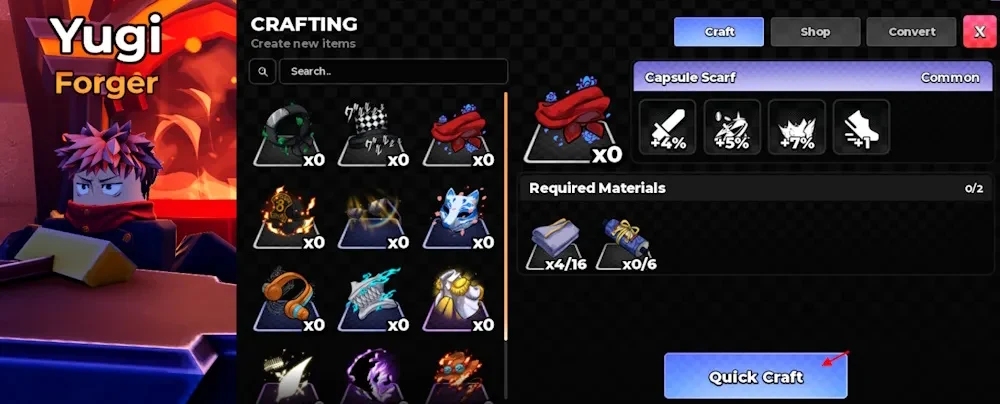
| Accessory | Rarity | Displayed bonuses | Required materials |
|---|---|---|---|
| Blast Archer Wings | Mythic | +16% Damage; +14% HP; +5% Cooldown Reduction; +10% Coins; +10% EXP; +10% Drop Rate | 80 Mana Feather; 10 Sun Core; 10 Magic Pendant; 10 Forbidden Fruit |
| Blast Archer Crown | Mythic | +20% Damage; +12% HP; +7% Cooldown Reduction; +7% Drop Rate | 60 Broken Blade; 8 Sun Core; 8 Magic Pendant; 8 Forbidden Fruit |
| Flame Pirate Hat | Legendary | +11% Damage; +10% Coins; +8% EXP; +10% Drop Rate | 70 Fine Cloth; 14 Tech Component; 6 Sun Core; 6 Forbidden Fruit |
| Dark Captain Wings | Legendary | +17% Damage; +10% HP; +6% Cooldown Reduction | 16 Mana Feather; 16 Broken Blade; 6 Cursed Finger; 6 Soul Fragment |
| Wind Spirit Wing | Legendary | +12% Damage; +8% EXP; +5% Cooldown Reduction; +4 Walk Speed | 40 Mana Feather; 12 Soul Fragment; 12 Waves Core; 6 Magic Pendant |
| Light Admiral Cloak | Legendary | +14% Damage; +8% EXP; +5% Drop Rate; +3 Walk Speed | 60 Fine Cloth; 12 Waves Core; 5 Sun Core; 5 Forbidden Fruit |
| Panther Hollow Mask | Epic | +12% Damage; +10% HP; +4% Drop Rate | 24 Eyeball; 8 Cursed Finger; 8 Soul Fragment |
| Diva Headphones | Epic | +6% Damage; +7% Coins; +8% EXP; +4% Drop Rate | 30 Fine Cloth; 20 Broken Blade; 8 Tech Component |
| Kitsune Mask | Epic | +8% Damage; +8% HP; +6% EXP; +2% Cooldown Reduction | 18 Eyeball; 12 Shinobi Scroll; 6 Cursed Finger |
| Sunglasses | Epic | +3% Damage; +4% HP; +11% Crit Chance; +5% Coins; +1 Walk Speed | 20 Fine Cloth; 8 Eyeball |
| 8th Brigade Fire Hat | Common | +7% Damage; +6% HP; +2% Cooldown Reduction | 20 Fine Cloth; 8 Shinobi Scroll |
| Capsule Scarf | Common | +4% Damage; +5% Coins; +7% EXP; +1 Walk Speed | 16 Fine Cloth; 6 Shinobi Scroll |
| Gentleman's Top Hat | Common | +3% Damage; +5% EXP; +2 Walk Speed | 8 Fine Cloth |
| Leaf Shinobi Headband | Common | +5% Damage; +5% EXP; +2 Walk Speed | 12 Fine Cloth; 5 Shinobi Scroll |
The bonuses cover different needs. Damage and HP are direct combat stats, while Cooldown Reduction, Walk Speed, Crit Chance, Coins, EXP, and Drop Rate affect how you play or how quickly you build resources. Use the displayed recipe as your shopping list, then confirm it again in the live menu before crafting.
How to craft accessories in Anime Zero
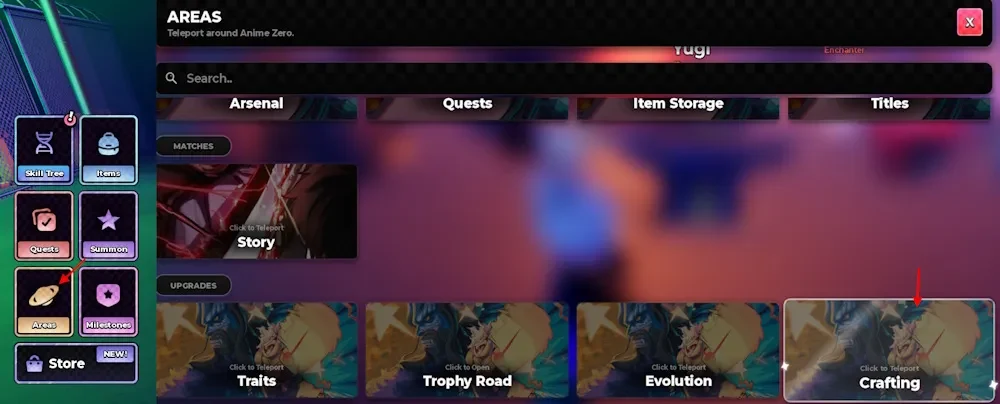
Crafting starts from the Areas menu and ends at Yugi the Forger. Follow these steps to reach the correct screen:
- Open
Areasfrom the left side of the screen. - Select
Craftingto teleport to the Crafting area.
- Find Yugi the Forger in the Crafting area.
- Open the crafting menu and choose the
Crafttab. - Select an accessory to see its bonuses and required materials.
- Collect the listed counts, select the accessory again, and click
Quick Craft.
The recipe list is the checkpoint before you start a run. If the selected accessory still needs materials, keep its name in mind and check the queue preview or other supply options below rather than farming a random item.
How to get crafting materials in Anime Zero
Use the target accessory's recipe to decide what to collect. The live queue preview shows which materials the selected run can drop, so check it before entering a run instead of relying on a fixed act list.
- Story Mode: Create a lobby and inspect the queue's drop preview. Story acts have their own material lists, so choose an act that shows the ingredient you need.
- Infinite Mode: Check the selected queue for its displayed drops before starting the run. Use this mode when its preview lists a material in your recipe.
- Breakable objects: Explore areas and break objects that can drop crafting materials. This route can fill gaps while you are already moving through an area.
After a run, compare your inventory with the recipe's required counts. If you are short on a material that appears in the shop, compare the Coin cost with another run. If you have extra materials, check the Convert tab before spending on a different recipe.
Anime Zero Material Shop prices and stock
Open the Shop tab in the crafting menu to buy the following materials with Coins. Each stock value is the listed daily limit for that item.
| Material | Rarity | Price per item | Daily stock |
|---|---|---|---|
| Fine Cloth | Common | 2,500 Coins | 10 |
| Shinobi Scroll | Common | 2,500 Coins | 10 |
| Mana Feather | Epic | 10,000 Coins | 5 |
| Eyeball | Epic | 10,000 Coins | 5 |
| Cursed Finger | Legendary | 40,000 Coins | 2 |
| Tech Component | Legendary | 40,000 Coins | 2 |
| Magic Pendant | Mythic | 150,000 Coins | 1 |
The shop restocks on a timer, so do not plan around a fixed interval. This is not a complete list of every recipe ingredient. Sun Core, Broken Blade, Forbidden Fruit, Soul Fragment, and Waves Core also appear in recipes but are not among these seven shop rows. Check Story or Infinite Mode and breakable-object drops for those materials, and use the Convert tab only when it offers the material you need.
How to convert materials in Anime Zero
Material Conversion helps when you have extra materials but are missing a specific ingredient. The Convert tab shows the available exchange and the amount required, so use the values in the menu instead of assuming a universal ratio.
- Open the crafting menu and select
Convert. - Choose the available material conversion and set the amount.
- Check that your inventory contains the required input items.
- Confirm the conversion when the button becomes available.
Return to the target accessory's Craft screen after converting and check the displayed counts again. When every requirement is met, use Quick Craft at Yugi to create the accessory.