The fastest way to earn money in SnowRunner is to take paid contracts and shorter tasks, group jobs with pickups and drop-offs close together, and sell the trucks and parts you don't need. SnowRunner is an off-road trucking game where you haul cargo across mud, snow and broken roads, so wasted driving is the biggest drain on your time. Every paid job pays cash and experience (XP) together, which means cutting wasted trips is where the real gains are.
| Money source | How it pays | Best use |
|---|---|---|
| Contracts | Cash and XP | Bigger, multi-step runs |
| Tasks | Cash and XP | Quick local jobs |
| Contests | Cash and XP | Extra paid work on your route |
| Trucks found on the map | Cash from a sale | Trucks your fleet doesn't need |
| Spare upgrades and trailers | Cash from a sale | Parts and trailers you won't use |
Check SnowRunner Contracts and Tasks on the Map Before You Drive
Open the region map before you leave the garage and look at each available contract and task. Every job lists its requirements, rewards, pickup points and delivery points. Reading those first tells you whether a job fits the trucks you have and how much driving it will take, so you don't start one that eats your time.
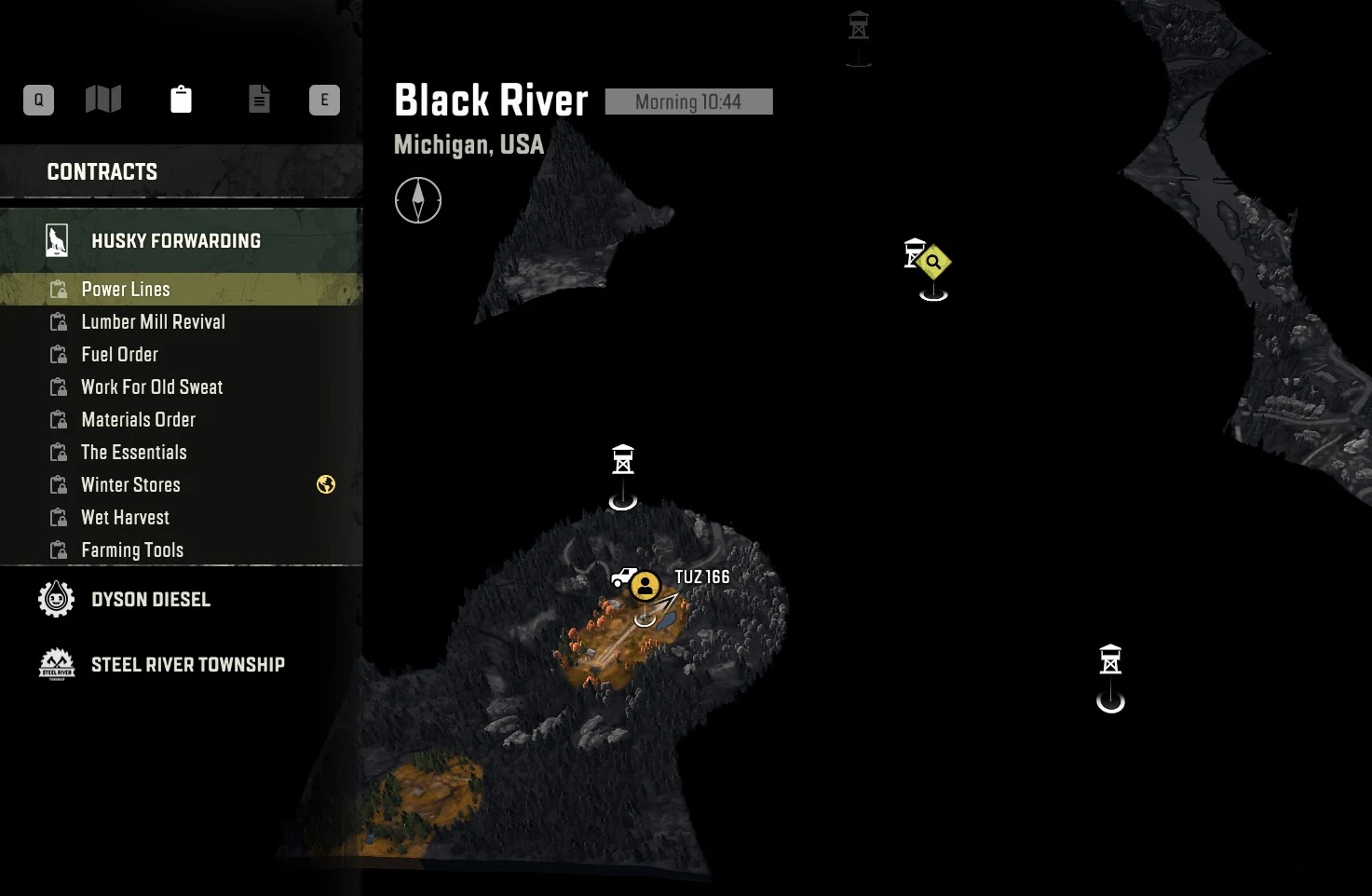
Contracts and tasks differ mostly in size. Contracts are usually longer, multi-step deliveries that can take you across several maps in one region. Tasks are shorter and local, like rescues, road repairs or cargo drops. Contests also pay cash and XP, so check their requirements the same way. Choose based on your trucks and how much driving you want to do, not on which job sounds bigger.
Driver Rank grows from the XP you earn on jobs. It unlocks some trucks and upgrades, but it's progression rather than a separate payout. Keep taking paid work as you go, and you'll reach better equipment that can make later routes quicker.
Open Roads and Bridges Early to Shorten Every Trip
Early in each new area, make the map easier to cross before chasing bigger payouts. Rebuild bridges and clear roadblocks that sit between you and the places your jobs send you. A road that trims the drive to a pickup point saves that time on every run after it, which makes it one of the best early investments you can make.
Observation towers are worth visiting too. Unlocking one reveals improved vehicle parts, new trucks that can be sent to the garage, and new missions. The time you spend on bridges and towers early is what makes the paid work that follows faster, so explore first and earn second.
Group Deliveries With Nearby Pickups and Drop-Offs
This is the steadiest way to fit more paid work into your time. Choose jobs whose pickups and drop-offs sit close together, so one route covers more than one stop. When your route and truck capacity allow it, carry cargo for a second nearby objective, or stage another truck to handle it. Finishing several jobs along one route cuts out the drive back to the start, which is time you'd otherwise spend with nothing to deliver.
Two rules keep grouped runs on track:
- Deliver cargo in the order the job description lists. If you don't, the game won't accept it, and you'll have to repeat the route.
- Make sure a job is active before you load its cargo. Cargo picked up for a job you aren't working on may not register on its own.
Save Fuel by Matching the Truck and Drive Mode to the Job
Fuel is the quiet cost that slows your income. A truck that burns through fuel can send you on long detours to gas stations, and detours pay nothing. Before you take a job, check that the truck suits the route. Early on, the Fleetstar F2070A is a strong main truck: it's heavy duty, pulls trailers well, and has four-wheel drive with a differential lock.
Drive mode matters too. Use all-wheel drive (AWD) on mud, hills and rough ground, where the extra grip keeps you moving. Switch it off on asphalt, where it only adds fuel use.
For long hauls, plan your route with the blue navigation points, favoring asphalt and avoiding the hardest stretches. Keep an eye on the fuel gauge and refuel before it reaches zero. Running dry can send you back to the nearest station, and that's time with no payout.
Get Unstuck Fast Without Losing Your Cargo
Getting stuck is the biggest time sink in mud and snow, so reduce the odds before you leave. Fit tires built for off-road driving, even on routes that look easy, and use AWD in mud and on slopes. Better traction means the terrain causes fewer problems along the way.
When you do get stuck, the winch is your first tool. Use it whenever the truck slows to a crawl. You can attach it to the rear and sides of the truck as well as the front, and it can anchor to objects hidden in grass. In a deep mud trap, progress can come inch by inch, so try turning the wheels, backing up slightly or shifting into a higher gear to break free.
The Recover option is the other tool. It sits in the function menu and sends the truck straight to the garage, where it's repaired and refueled. Recovering is free, which makes it handy after a long run, but you lose the cargo you're carrying. Keep it for when you're completely stuck. If you'd rather keep the load, a second truck carrying a repair kit can help you get it moving again.
Team Up in SnowRunner Co-op to Speed Up Paid Jobs
Co-op supports up to four players, and it helps most on jobs with a lot of driving. Every player in the session receives the mission's cash and XP. Mission and map progress belongs to the host's world, so the host should start the job the group plans to finish.
Split the crew around nearby objectives rather than sending everyone across the map. One player can haul the cargo while others handle short tasks close by, pull the hauling truck out of a pit or scout the terrain ahead. Keeping everyone within reach cuts downtime, so the truck keeps moving while the group earns.
Co-op has one limit. Objective reward trucks follow the host's progress, so the session isn't a way for every player to duplicate and sell the same reward. A past update fixed a bug that had unlocked those trucks for players who only joined a session.
Sell Spare Trucks and Parts Once You Check the Offer
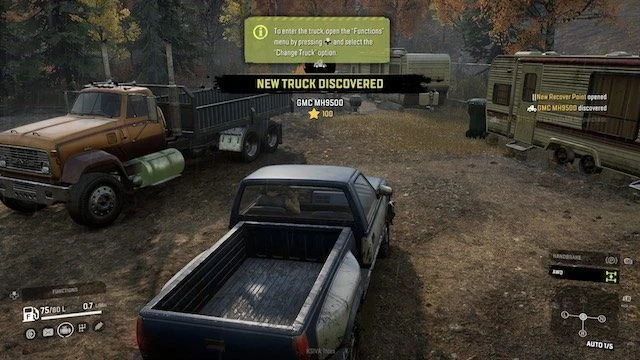
Start with the free trucks you find on the map. Send them to the garage through the function menu, and if your fleet doesn't need them, sell them for cash. Each vehicle has its own sale offer, so check the number on screen before you count the money. Offers vary by vehicle, so don't plan around one fixed amount for every discovery. A truck tied to a task isn't a free discovery, so don't treat it as spare stock.
Upgrades follow a similar rule. Installed upgrades raise a truck's sale value. Upgrades sitting in your inventory don't sell with the truck automatically, so sell compatible spare parts separately if you won't use them.
The sell-back rules depend on how you play:
- Normal mode: Unused trucks, upgrades and trailers can be sold through the matching garage or Trailer Store menus. Return found or unused trailers at a Trailer Store.
- Hard Mode: Trucks and upgrades sell for 50% of their purchase value, and trailers return no money. Don't count on trailer returns in this mode.
- New Game+: Sale settings can be customized, so check the rules for your save instead of assuming normal-mode returns.
A past update fixed a bug that could lower a truck's sell price if it was bought with "Purchase" instead of "Purchase and Deploy" in the Truck Store. It's still worth reading the offer before you sell anything you bought.