If you want Idle Mafia Game to feel like more than a solo cash loop, a Family is where your progress starts working as a group. Members contribute to a shared vault, unlock perks that affect the whole faction, and coordinate fights that can lead to territory control and meaningful war outcomes.
The Family screen has several menus and three different contribution types, so the useful first decision is whether to create a group or join one that already has a working roster. Here is what each menu does, what the listed costs buy, and how to manage your resources without guessing at rules the live interface may change.
What Families Do in Idle Mafia Game
A Family is a player-created faction. After you create or join one, you can use its Overview, Members, Perks, Shop, War, and Audit Log menus. The group loop is straightforward: earn Cash through your normal Properties and jobs, collect Gold Bars through successful Heists, contribute resources to the Family, and use the resulting progress to improve shared perks or organize group activity.
The official Roblox description also connects Families with going to war, taking over the map, earning trophies, and climbing leaderboards. That makes a Family useful for more than a name beside your account. It gives a group a way to pool resources and turn individual activity into faction-wide progression. If you are still building your solo income, the Idle Mafia Game beginner guide is a useful primer on the job, property, and crew loop that feeds your Family contributions.
How to Create or Join a Family in Idle Mafia Game
You can either spend Cash to start a faction with your own identity or use the available Family list to find an existing group. Joining is the quicker way to reach the management menus, while creating gives you responsibility for the notice, roster, resources, and group direction.
Creating a Family
- Open the Family screen. You must not already belong to another Family.
- If you are already a member, open Family Overview and choose Leave Family before trying to create one.
- Choose the option to create a Family and spend 10,000 Cash.
- Set the Family's name, description, and icon. These are the identity details other players see when they look for a faction.
Once you confirm the creation, the new Family is ready for members and contributions. Family costs and limits can change with live updates, so check the current Family screen if a displayed value differs from the ones listed here.
Joining an Existing Family
- Open the Family area and browse the available list.
- Select a Family and send a join request, or accept an invitation from that Family's leader.
- After membership is confirmed, open the Family menus to see its Overview, Members, Perks, Shop, War, and Audit Log.
Joining first is a sensible choice if you want to learn the contribution rhythm before managing a faction yourself. Once you are inside, the notice, roster, donations, and Audit Log give you a better picture of how the group operates than its name alone.
Idle Mafia Game Family Overview and Member Ranks
The Overview tab is the Family's status and contribution screen. It shows the Family name, creation date, level, member count, number of unlocked perks, Family notice, Family Vault, active perks, and occupied territories. It is also where you make Cash and Gold Bar donations.
Cash is passively earned through Properties, while Gold Bars require a successful Heist. If you are trying to supply the second resource, see the Idle Mafia Game Heists guide before treating Gold Bars as a routine donation currency.
The Members tab shows each player's Cash, Gold Bars, and Stamina donations alongside their rank. The six ranks and the listed seats for each are:
| Rank | Seats listed |
|---|---|
| Boss | 1 |
| Underboss | 3 |
| Advisor | 5 |
| Capo | 15 |
| Associate | No stated limit |
| Soldier | No stated limit |
The Boss, Underbosses, and Advisors have management privileges such as writing the Family notice, spending faction resources, and giving war orders. Only the Boss can change core identity details such as the Family name, icon, and description. For any action not listed here, follow the permission shown by the current Family menu.
Idle Mafia Game Family Perks and Donations
The Perks tab separates contributions into Cash, Gold, and Stamina paths. The first two are leadership-unlocked perk groups, while all members can unlock Stamina Perks through Stamina contribution.
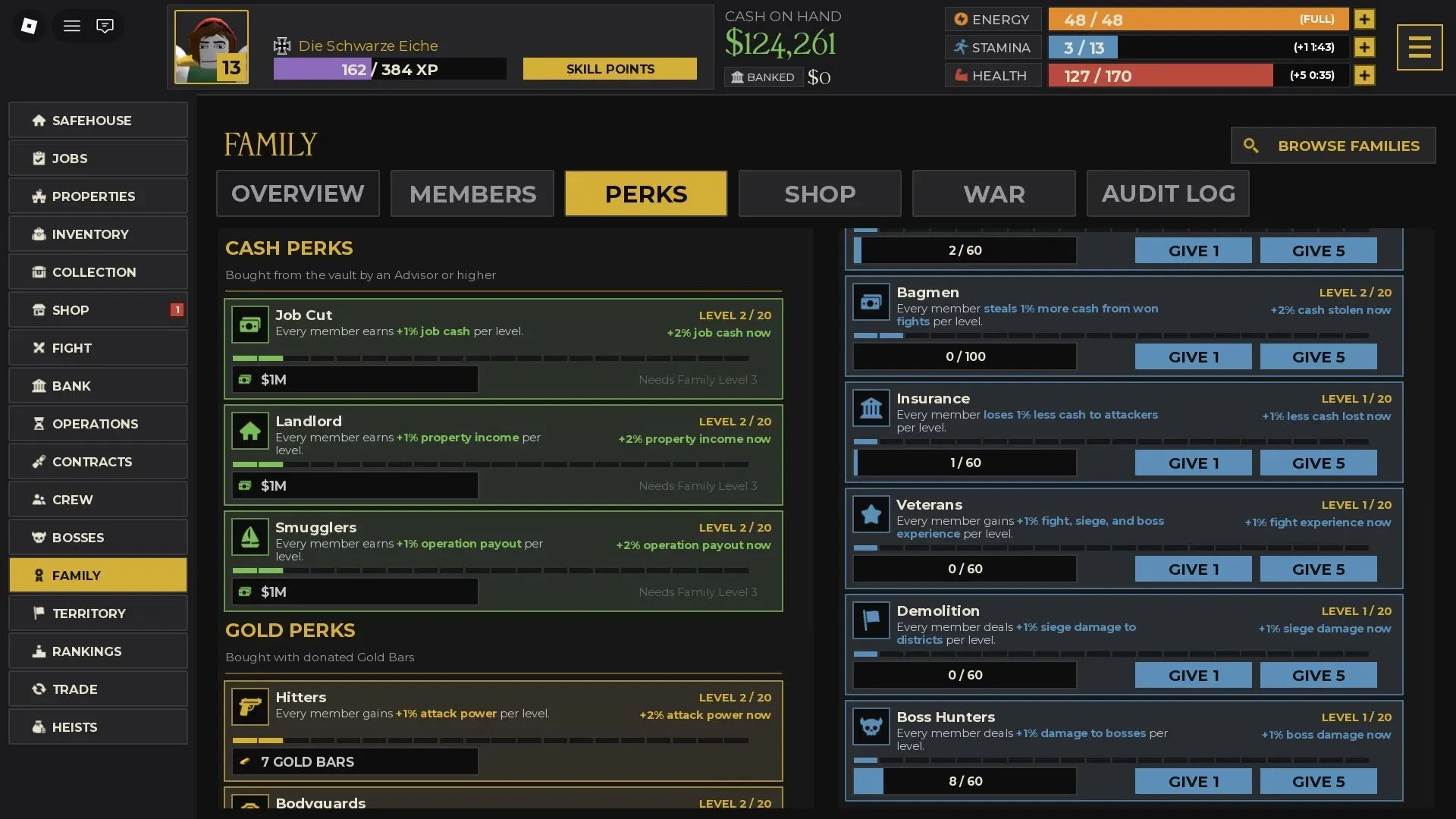
| Perk group | Contribution | Main effects described for members |
|---|---|---|
| Cash Perks | Cash | Job cash, property income, and operation payout |
| Gold Perks | Gold Bars | Attack power, defense power, and job-item drops with each level |
| Stamina Perks | Stamina | Attack and defense, job experience, health and Stamina regeneration, fight Cash won or lost, fight/siege/boss experience, siege damage to districts, and damage to bosses |
Choose the contribution path that matches your Family's goal. Cash Perks affect members' job cash, property income, and operation payout; Gold Perks affect members' attack power, defense power, and job-item drops; Stamina Perks add the broader combat, experience, regeneration, district, and boss effects listed above for all members.
Use the Perks tab to check each upgrade's current details before donating. Perk values can change with live updates, so plan from what your Family screen shows instead of assuming a percentage or level cost.
Idle Mafia Game Family Shop: Spotlight and Extra Slots
The Shop is for optional discovery and roster expansion. A Spotlight reservation places the Family on the Family screen for new players to find, while extra slots increase capacity when the existing roster is full.
| Shop purchase | Listed cost | Result |
|---|---|---|
| Spotlight for 8 hours | 10 Gold Bars | Reserves the Family's Spotlight placement for new-player discovery |
| Spotlight for 24 hours | 25 Gold Bars | Reserves the same placement for a longer window |
| Additional member slot | 250 Gold Bars per slot | Adds capacity, with up to 10 additional slots available |
The Boss, Underbosses, and Advisors can buy the extra member slots. Because Spotlight and slots spend Gold Bars without directly unlocking a listed perk, they make more sense after the Family has a contribution plan and a roster that can use the added visibility or capacity.
How Family War Works in Idle Mafia Game
War turns a Family's shared resources and member activity into a fight against another Family. The safe way to think about the sequence is:
- Family leadership opens the War menu and declares war on another Family. Check the permission shown in your current War screen before assuming which management rank can declare.
- Members earn points by winning fights against members of the rival Family.
- The declaration stakes a fixed percentage of the net Cash in your Family Vault. Check the displayed cost in the War menu before committing Vault Cash.
- If your Family wins, its deposited money is returned and the same amount is taken from the losing Family's Vault.
- If the war is inconclusive, the two Families can sign a truce.
War schedule, eligibility threshold, territory formula, and exact claim flow can depend on the live rules. Use the current War screen for those conditions. Before declaring, make sure the members who will earn points understand the target and the Vault risk, then use the Audit Log afterward to review what happened.
How the Audit Log Helps Manage an Idle Mafia Game Family
The Audit Log is a chronological record visible to every Family member. It includes contribution and performance activity such as perk upgrades, Family notices, donations, war declarations, and other faction actions.
For a leader, the Audit Log shows whether the group is contributing often enough to support its chosen goals. Check the log after a donation push, perk upgrade, notice change, or war declaration to match the visible activity with the plan the Family is following. Members can use the same history to understand where shared resources went and whether the group is ready for another commitment.
If you are deciding what to do next, join a compatible active Family before spending resources on optional expansion. If you want control over the identity and direction, create one for 10,000 Cash, build a dependable perk base, and review participation before buying extra slots or risking Family Vault Cash in war.