Hacker is the limited five-star class in Survive the Apocalypse. Buy it from the Classes shop for 1,000 Data Coins, then use its Infiltrator Uzi to spread Virus and turn infected zombie deaths into explosions.
The Hacker Event update arrived on August 15, 2026. Event values can change, so check the live shop if its numbers do not match the route below.

Collect 1,000 Data Coins and buy Hacker from the Classes shop
You have two listed ways to earn Data Coins:
- Clear a Mansion. A Mansion appears every three hours and stays for 30 minutes. Finish the run to claim 100 Data Coins.
- Complete Daily Quests. Each of the three Daily Quests gives 25 Data Coins.
Those rewards add up to ten completed Mansion runs or 40 Daily Quest rewards at 25 coins each. The Mansion pays more per clear, while Daily Quests help when you are not waiting for the next event activity.
Once you have 1,000 Data Coins, open the Classes shop, select Hacker, and buy the class.
What Hacker gives you
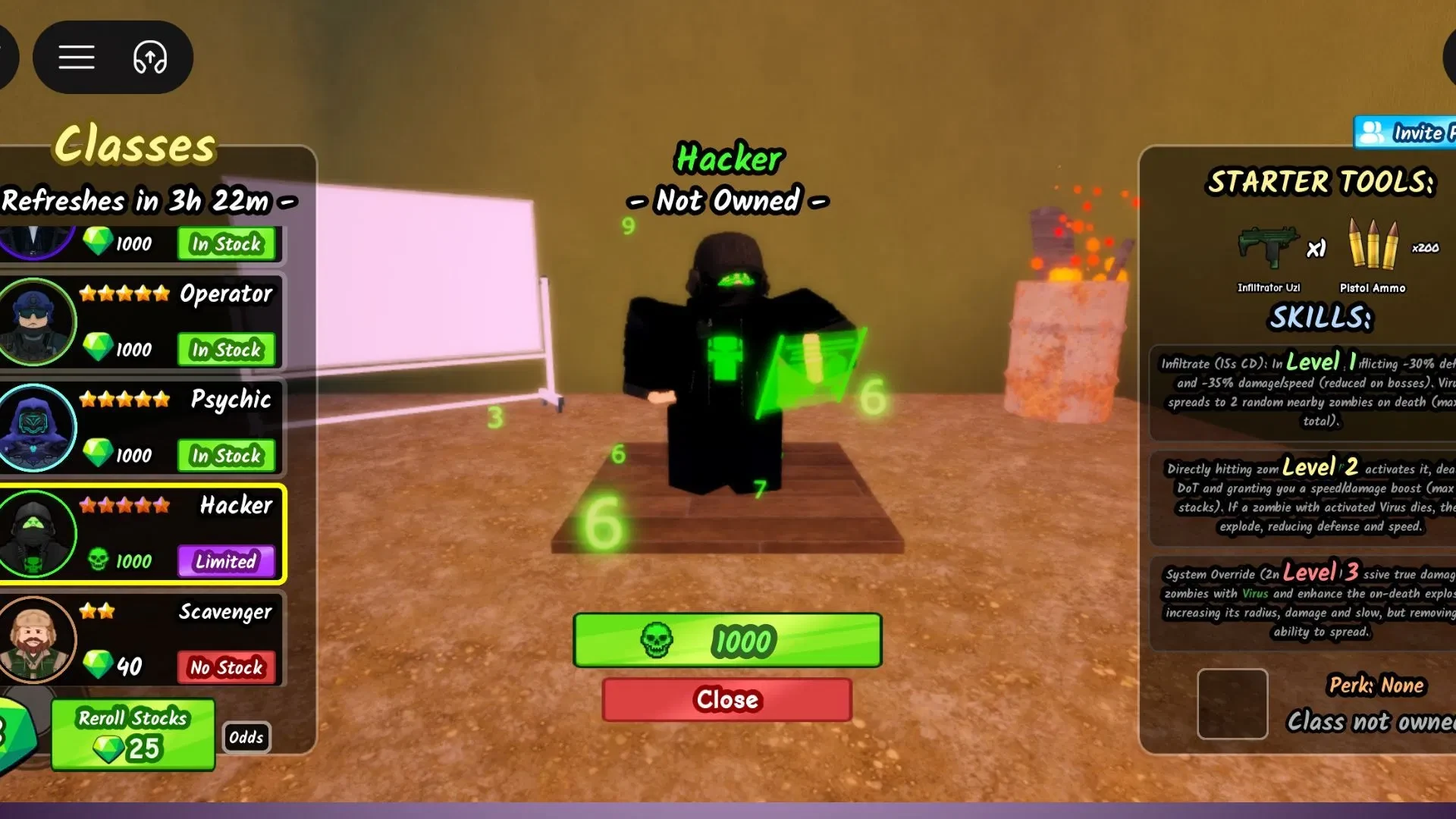
Hacker starts with the Infiltrator Uzi and 200 pistol ammo. Its three ability levels build one chain: mark zombies with Virus, activate that effect with direct hits, then use System Override when a stronger blast matters more than spreading the effect.
The Survive the Apocalypse codes page can help if you are also saving Emeralds for other class purchases. Hacker itself uses Data Coins, not Emeralds.
Use Virus first, then trigger explosions with System Override
Hacker is easiest to understand as a short setup-and-payoff loop. Start with Infiltrate, then keep your Uzi on Virus-affected targets before spending the top ability.
- Level 1, Infiltrate: The ability has a 15-second cooldown. It applies Virus, reducing defense by 30% and damage and speed by 35%. The debuff is reduced on bosses. When a Virus-affected zombie dies, Virus spreads to two random nearby zombies, up to 10 total.
- Level 2: Directly hitting a Virus-affected zombie activates Virus. The effect adds damage over time and a speed and damage boost that can reach five stacks. Deaths from activated Virus also explode, reducing defense and speed.
- Level 3, System Override: This ability has a two-minute cooldown. It deals massive true damage to Virus targets, strengthens the death explosion's radius, damage, and slow, and removes the spread effect.
A practical sequence is simple: use Infiltrate to apply Virus, directly hit the affected zombies with the Uzi to activate it, and let the resulting deaths spread or explode. Save System Override for a packed Virus wave when the larger, stronger detonation is worth giving up the spread. That choice is practical usage advice from how the listed effects fit together.
On bosses, plan around the reduced Virus debuff instead of expecting the full defense, damage, and speed reduction. System Override can still hit Virus targets, but its spread tradeoff matters more when nearby zombies are useful targets.