Prestige in Paint to Get Rich is a full run reset, so treat the button as a wipe rather than a normal upgrade. Confirming it removes your current studio progress, including Cash, studio upgrades, paintings, hired artists, painting archives, and other upgrades. The tradeoff is a permanent Cash multiplier that improves earnings from every income stream and moves you toward World 2, the Museum.
This guide explains what each live requirement means, how to fill it, what happens after you press Begin Prestige, and why the Museum milestone needs repeated resets. The target values can change with the game, so use the Prestige menu on your account for the numbers shown there.
What does Prestige do in Paint to Get Rich?
Prestige resets the studio run after you confirm it. Your Cash, paintings, studio upgrades, hired artists, painting archive, and other upgrades do not carry into the new run. The lasting reward is a permanent Cash multiplier that improves the money you earn throughout the game.
That reset is also part of the game's world progression. Roblox's Fresh Canvas badge marks the first Prestige milestone, while the Museum Bound badge confirms the World 2 museum destination. Finish any studio work you still want before accepting the wipe, then use the multiplier to rebuild with stronger Cash earnings.
What are the Paint to Get Rich Prestige requirements?
Open the live Prestige menu before you plan the reset. It shows three separate lines, and the game decides the current target for each one. The numeric targets are not published as fixed values, so use the amounts displayed in your menu.
| Requirement | How to advance it | What to remember |
|---|---|---|
| Cash | Earn the displayed Cash total while painting and selling. | Any Cash you have when you confirm Prestige is lost in the reset. |
| Paintings sold | Place a finished painting on a table, wait for a buyer's offer, and press Sell. | Finishing a painting alone does not complete the sold-painting line. |
| Stars | Finish paintings. | This counter can advance before a buyer purchases the painting. |
Stars and paintings sold are separate counters. A finished canvas can give you Stars, but you still need to display it, wait for an offer, and choose Sell for it to count as a completed sale. The sale also adds Cash, so active painting and selling can move more than one line during the same run.
How to Prestige in Paint to Get Rich
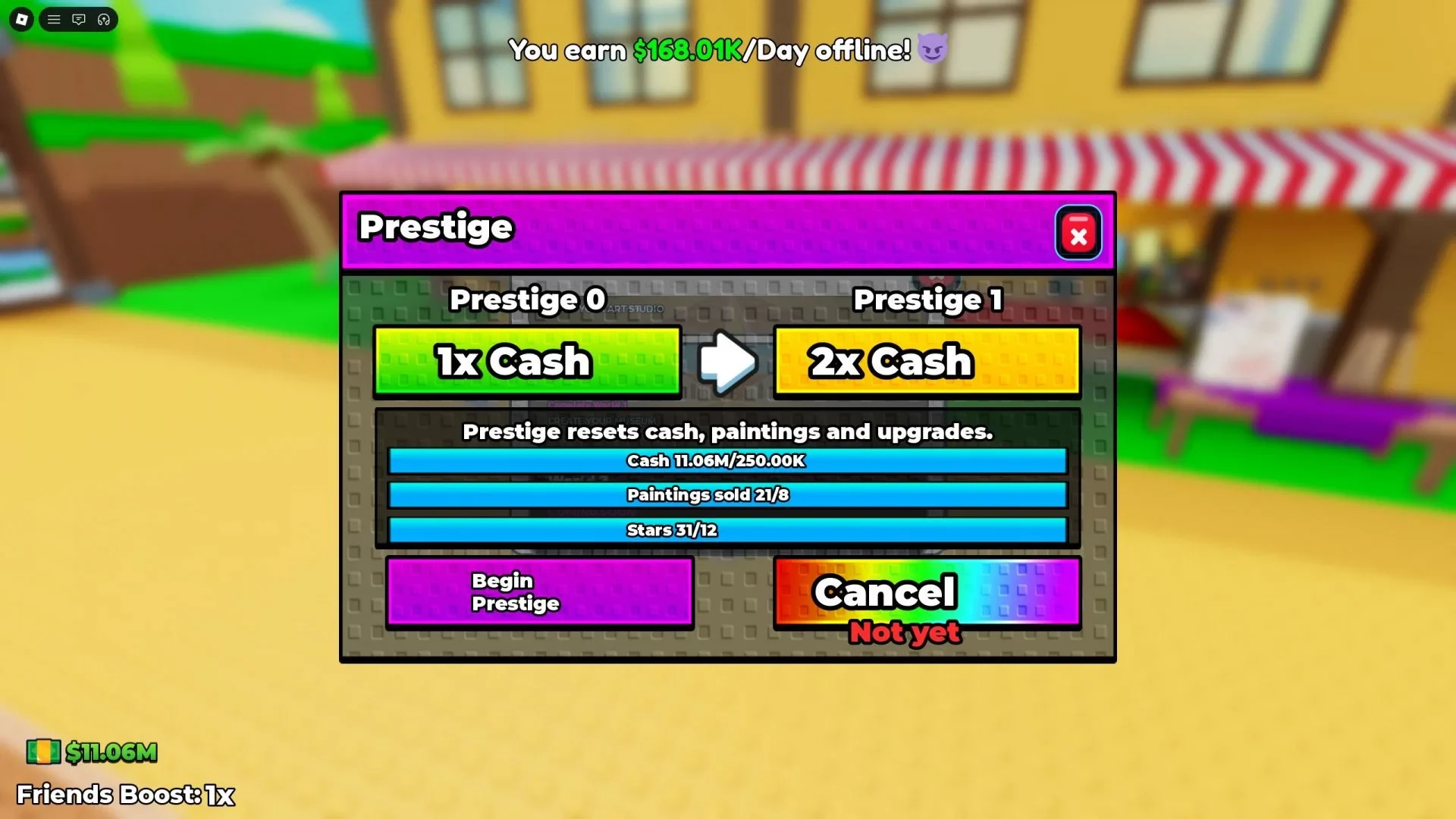
The live menu shows the three counters and the Begin Prestige control.
Follow this sequence when you are ready to reset:
- Click the Prestige button on the left side of the screen to open the menu.
- Check the Cash, paintings sold, and Stars lines against the current targets shown there. Do not rely on a fixed number from an older guide.
- If a line is incomplete, keep painting to earn Stars. Put finished paintings on a table, wait for buyer offers, and press Sell so the sale and Cash progress register.
- When all three lines are full, press Begin Prestige.
- Read the confirmation dialog before accepting. This is the last safe point to stop if you still need the current studio, Cash, paintings, or upgrades.
- Confirm the reset. A short cutscene plays, and the studio run is reset.
The reset does not begin when you open the menu or press Begin Prestige. It begins after you accept the confirmation, so use that warning to check that the permanent Cash multiplier is worth losing the current run.
How should you prepare before Prestige?
Use the studio while it still belongs to your current run. Finish paintings that you want to sell, collect the Cash from completed sales, and check the requirement lines again before you confirm. Paintings, hired artists, the painting archive, Cash, and upgrades will not be available after the reset.
Keep active painting and selling as your main way to fill the counters. NPC painters can generate passive Cash, but they do not earn enough to make a meaningful dent in the Prestige requirements. They can help your balance, but do not wait for them to fill the Cash or sale counters by themselves.
Most importantly, check each line separately. A full Stars counter does not mean that your paintings-sold counter is full, and a buyer offer does not replace pressing Sell. Confirm only after all three displayed requirements are complete and you are ready to rebuild the studio.
How many Prestiges unlock World 2 in Paint to Get Rich?
World 2, the Museum, is currently reported to unlock at Prestige level 3. The official Paint to Get Rich listing advertises W2 / The Museum, and the Museum Bound badge confirms that the destination exists. The badge does not list the level threshold, so treat Prestige 3 as the current route rather than a permanent formula. If the live game shows a different unlock prompt, follow that in-game information.
To reach the Museum, repeat the same process: fill the three live lines, open Prestige from the left-side button, read the warning, and confirm only when you accept the reset. Each completed reset moves your Prestige progression forward while the permanent Cash multiplier helps with the next studio run.
Before every Prestige, check the menu again and finish any sale you want counted. When all three lines are full and you are ready to lose the current studio run, confirmation is the step that trades it for the permanent Cash multiplier and the next part of the Museum progression.