

No, not fully. Overcooked! 2 is a co-op cooking game for up to four players, and the standalone version doesn't let PC and console players join the same kitchen. Crossplay is limited to certain Windows PC stores, while Overcooked! All You Can Eat, a separate edition, lets players on PC, Switch, PlayStation and Xbox play together as long as everyone owns it.
| Edition | Platform | Can play with |
|---|---|---|
| Standalone Overcooked! 2 | Steam (Windows) | Epic Games Store, PC Game Pass |
| Standalone Overcooked! 2 | Epic Games Store | Steam, GOG, PC Game Pass |
| Standalone Overcooked! 2 | GOG | Epic Games Store, PC Game Pass |
| Standalone Overcooked! 2 | PC Game Pass (Windows Store) | Steam, Epic Games Store, GOG |
| Standalone Overcooked! 2 | PS4 and PS5 | Each other |
| Standalone Overcooked! 2 | Xbox One and Xbox Series X/S | Each other |
| Standalone Overcooked! 2 | Nintendo Switch | Other Switch players, and Switch 2 Edition players online |
| Overcooked! 2 Nintendo Switch 2 Edition | Nintendo Switch 2 | Switch 1 players online |
| Overcooked! All You Can Eat | Steam, Switch, PS4, PS5, Xbox One, Xbox Series X/S | Players on any of these platforms |
Which Platforms and PC Stores Can Play Together in Overcooked! 2
The main divide in the standalone game is between PC and consoles. Console-to-PC play isn't supported, so a PC player and a console player can't join the same game.
Within consoles, the groups are smaller. PS4 and PS5 players can play together, and Xbox One and Xbox Series X/S players can play together. The standalone game doesn't connect different console families, so PlayStation, Xbox and Nintendo Switch players stay in their own groups.
Nintendo Switch players play with other Switch players. The Overcooked! 2 Nintendo Switch 2 Edition is a separate version, and it can play online with the original Switch version.
On PC, crossplay works only between these Windows store pairs:
- Steam and Epic Games Store
- Steam and PC Game Pass (Windows Store)
- Epic Games Store, GOG and PC Game Pass, which can all play together
Steam and GOG aren't one of the supported pairs. Each pairing also needs compatible PC versions or branches, and the exact requirements can vary by version, so check both sides before you plan a session. Mac and Linux aren't part of these pairings.
How to Set Up PC Crossplay Between Steam and Other Stores
Steam players have to switch to a beta branch before PC crossplay will work. The crossplay version is opt-in, so you have to choose it yourself rather than getting it by default.
- Open your Steam Library, right-click Overcooked! 2, and choose Properties.
- Go to the Betas tab and select crossplay_branch.
- Let Steam install the branch, then launch the game.
- Open the in-game Team17 friends list and add or invite your friend by their Team17 ID.
- Ask your friend to confirm they're on a compatible version from Epic Games Store or PC Game Pass before you start.
The invite runs through Team17's in-game friends system, not your store's friends list, so you'll need your friend's Team17 ID. If you can't connect, check that both sides are on compatible builds, because the exact version decides whether the pairing lines up.
How Local and Online Play Work in Overcooked! 2
Standalone Overcooked! 2 supports up to four players in total, whether they're in the same room, online or both. How you bring people in depends on the mode, so these are the rules to know.
- Local play: Up to three players can share one console or computer while other players join online.
- Campaign: Invite players from your friends list.
- Arcade and Versus: Use the in-game lobby or matchmaking to find players.
- Steam, PS4 and Xbox: Online players can join your game through matchmaking.
- Switch local wireless: Up to four players can play together over local wireless. This is a local mode, not crossplay. When two or three players are in the game locally, online friends can search for and join.
- PC, Mac and Linux: Two local players can split one keyboard. Anyone joining online needs their own controller or keyboard.
Chat also differs by platform. Xbox One and PS4 have in-game chat, while Steam and Switch players need a third-party app such as Steam voice chat, Skype or Discord.
Overcooked! All You Can Eat Is the Edition With Full Crossplay
Overcooked! All You Can Eat is a separate edition that supports crossplay across Steam, Nintendo Switch, PS4, PS5, Xbox One and Xbox Series X/S. Crossplay covers every level, including the campaign, so friends on different platforms can play through the story together.
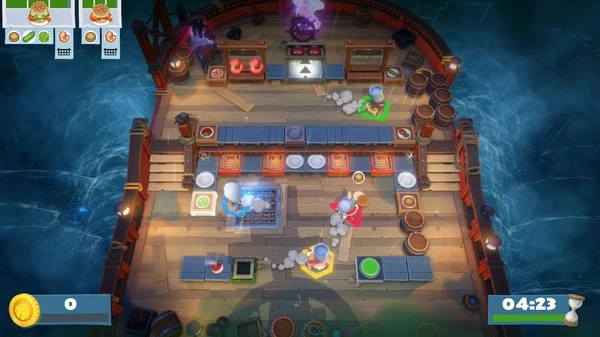
The edition also bundles every level of the original Overcooked! and Overcooked! 2 campaigns, along with its own content, and all of it can be played cross-platform. Cross-platform play can be turned off in the game settings if you only want to play with people on your own platform.
Two rules matter before you buy. Every player in the group needs their own copy of All You Can Eat, and a player who only has standalone Overcooked! 2 can't join an All You Can Eat session. Up to four players can play, either alone or with up to three friends, online or offline.
How to Play All You Can Eat With Friends on Other Platforms
Once everyone owns the game, the setup is short. The mode you pick decides whether you invite friends or search for players.
- Get All You Can Eat on each platform. Everyone needs a copy on the platform they play on. A standalone Overcooked! 2 copy won't work for the session.
- Add friends in the Team17 friends tab. Use this tab to add cross-platform friends and send them invites.
- Check cross-platform play in settings. If it's off, turn it on so matchmaking can connect you with players on other platforms.
- Pick your mode. For the campaign, invite friends from your list. In Arcade, you can use public matchmaking or play privately with friends, and public matchmaking is also available in Co-op and Versus.
- Bring local players online if needed. Local players can join an online group, so people in the same room can play with friends on other platforms.
Do Save Files and Progress Carry Across Platforms?
Playing together and sharing progress are separate things. Crossplay lets friends join the same game, but it doesn't move your saves from one platform to another.
In All You Can Eat, saves are locked to the platform you play on, so progress made on Steam stays on Steam and progress made on Xbox stays on Xbox. Saves from the original Overcooked! and Overcooked! 2 don't carry over into All You Can Eat either, because it's its own game with its own save files.
For the standalone game, don't count on moving a save between PC stores or consoles. Keep your progress on the platform where you started.
Nintendo Switch is the one exception. Progress can be transferred between the original Switch version and the Overcooked! 2 Nintendo Switch 2 Edition, and back again, and the two versions can play online together.