


American Truck Simulator puts you in the seat of a driver for hire, with the open roads, landscapes and well-known landmarks of the United States as your workplace. You start in the local freight market and work your way up to owner-operator, which means a driver who owns the truck. The longer goal is to build one of the largest transportation companies in the country.
You can start a session by taking a job or simply driving off into the world. Early on, Quick Jobs are your only source of income. Your employer lends you a loaded truck and covers the fuel and repairs, so you can earn without paying for either, though the pay is low. Once you buy your own truck, the Freight Market opens up with better rates, but you now pay for fuel and repairs and drive to the depot to pick up the cargo yourself.
As your money grows, you can buy more trucks, hire drivers, open garages and improve and customize the trucks you run. Jobs only appear in the areas you have already explored, so driving new roads, cities and landmarks is how your options grow. Road Trip adds a Car Mode, where you take courier jobs and build a reputation with customers. Your money and explored roads carry across your truck and car careers, but each mode keeps its own progression.
- Developer
- SCS Software
- Publisher
- SCS Software
- Release
- Worldwide: 2016-02-02
- Platforms
- Windows, macOS, Linux, SteamOS
Game data
Trucks
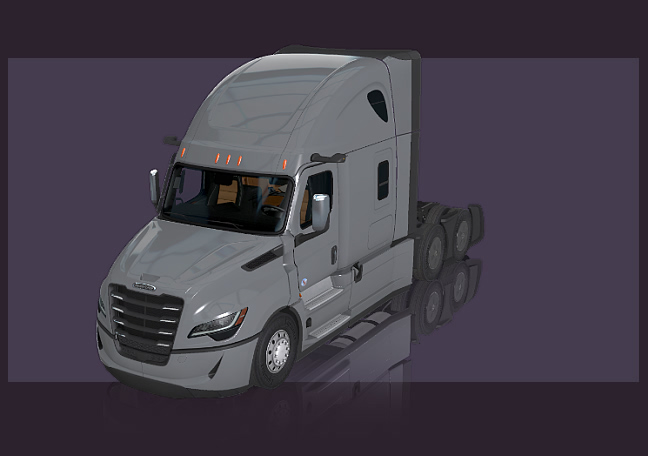
Trucks are the player-owned tractors used to haul jobs in American Truck Simulator, bought from each maker's dealership or on the used-truck market. Before buying, you choose a truck's cabin, engine and chassis, and those options are set by each model. Some models are only sold used, while others arrived as free DLC add-ons or came through regular updates.


States and Map DLCs
States are the regional map areas of American Truck Simulator, and each one adds roads, cities, industries and landmarks to the playable map. California and Nevada come with the base game, Arizona is a free map DLC, and the rest are paid map DLCs sold on Steam. Some states have no direct road link to the rest of the map, so Quick Jobs can start there and owned garages let you travel between them.


Trailers and Configurations
Trailers are the boxes, decks, tanks and dumpers your truck pulls to carry cargo in American Truck Simulator, and each type suits certain loads. Many can be bought from trailer dealers, configured in the trailer upgrade shop and used for Cargo Market jobs. Trailer chains set how many trailers run behind one truck, and state rules decide which setups are allowed where your garage is.


Cargo
Cargo types are the goods you haul in American Truck Simulator, and each one sets its own weight range, the trailer bodies that can carry it, and any skill or ADR certificate it needs. They come from the base game, the map DLC, the cargo packs and Special Transport. Freight Market, Cargo Market and Special Transport jobs all use them, and Cargo Market only offers loads that match the body of a trailer you own.



ATS gameplay tips
Plan Freight Market jobs before you set off. You can take whatever cargo is available at a depot as you drive by, but planning ahead through the Freight Market is what gets you the best deals. Look at the offers first so you know the load and route before you leave.
Build mandatory breaks into long truck runs. Trucks have to take legally required rest periods, so a long haul needs room for those stops. Road Trip cars don't have to take them, so this planning only applies to your trucks.
Check the Tourist Boards on your route. Each completed board awards a postcard, so it pays to see which boards cover the states you already drive through. The Route 66 Cross-Border Tourist Board visits locations in eight states, from Illinois to California, and its special postcard needs every covered map expansion and each linked exploration location. That special postcard also comes with a Route 66 Air Freshener.
Arrive when the customer expects you, not early. After each Road Trip delivery, the customer reviews Time Management, Vehicle Appearance and Cargo Handling. Arriving early can be just as unwelcome as arriving late, so aim for the time the customer is expecting. Your star ratings add up to a Courier Rating, which decides which jobs you can take, how far the routes can run and how much you earn.
Read the customer's priorities before you accept. Some customers care more about one of the three review areas, and you can see that before taking the job. Meeting those expectations is more demanding, but the payout can be bigger, so pick the jobs that fit the effort you want to put in.
Start Road Trip with Quick Jobs and move to the Dispatch Market later. Quick Jobs supply the car, so you can learn how deliveries work before you use one of your own. Once you have a car in your garage, the Dispatch Market works in a similar way, but it pays a little more because you carry the expenses yourself.