Grand Theft Auto VI, Rockstar Games' open-world crime game, launches on November 19, 2026, on PS5 and Xbox Series X/S. Rockstar doesn't appear to have published a known-issues list, so these are the problems that have been reported. PlayStation has official steps for boxed copies with missing or damaged codes and for download and launch problems, but the Japan code expiry and the frame-rate dips have no fix.
| Issue | Platform | Status | Fix or workaround |
|---|---|---|---|
| Boxed copy with a missing, damaged or already-used code | PS5 and Xbox Series X/S | Unresolved; no count of affected buyers | Contact the retailer; check Order History |
| PS5 codes sold in Japan expire 170 days after launch | PS5 (Japan) | No fix; Rockstar hasn't said whether future copies will change | Redeem the code well before the 170 days run out |
| PS5 update not showing yet | PS5 | Staged rollout; timing not confirmed; no patch notes | Check the download queue or turn on automatic updates |
| Download or launch fails | PS5 | Covered by PlayStation's official steps | Pause and resume, cancel and delete, rebuild the database, or restore the license |
| Frame-rate dips in busy areas and fast action | Standard PS5 | Reported; no fix announced | None available |
| Floating coffee cup after switching characters | Not stated | Single report; minor visual glitch | No fix reported |
Boxed Copies With Missing or Already-Used Codes
Some physical copies of GTA 6 come without a working download code. The box has no disc, so the code is the only way to get the game.
 Reported problems include a code that is missing, blank or damaged, and a code that already shows as used when a buyer enters it. One buyer described a gray strip in the sleeve where the code should be.
The problem is reported on both Xbox and PlayStation. Reports name GameStop, Best Buy and Rockstar's own direct sales as sellers of affected boxes. Because the cases were sealed, it isn't clear which seller is responsible, and no cause has been confirmed. Rockstar hasn't publicly confirmed a widespread problem, and no count of affected buyers has been published. A few buyers say a store turned down a refund or replacement, but those accounts are unconfirmed.
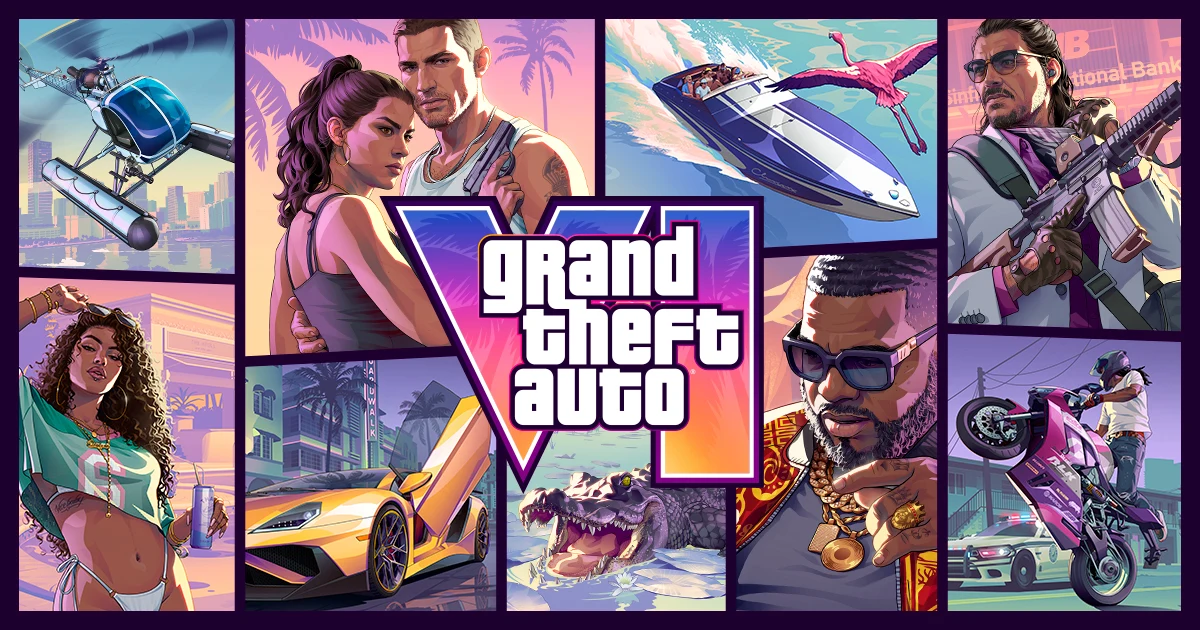
PlayStation's official answer is to contact the retailer. Its code support page gives that advice for a missing or unreadable code and for refunds, and it doesn't mention replacements. If the code says it has already been used, sign in, select your avatar, open Order History and check that your GTA VI pre-order went through.
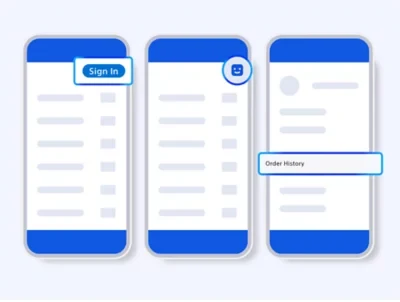 If the code was entered on another account, funds and content can't be moved between accounts, so the retailer is the next step if you're still stuck.
For the full steps on a missing code, read what to do with a boxed GTA 6 copy that has no download code.
Japan PS5 Codes Expire 170 Days After Launch
PS5 codes sold in Japan expire 170 days after the game's release. The limit applies only in Japan. A Japanese retail copy bought after that window could contain a code that no longer works.
Rockstar hasn't said whether future production runs in Japan will change, and there is no fix for the expiry itself. The practical step for Japanese PS5 buyers is to redeem the code early, well inside the 170 days, rather than waiting.
Why a GTA 6 PS5 Update May Not Show Up Yet
Before launch, PS5 players were offered two small update files, and they didn't reach everyone at the same time. The rollout is staged. One group gets the update first, and the rest follow hours later. The reported timings differ from one another, and Rockstar hasn't confirmed the schedule.
That's why an update can be waiting on one PS5 and missing from another.
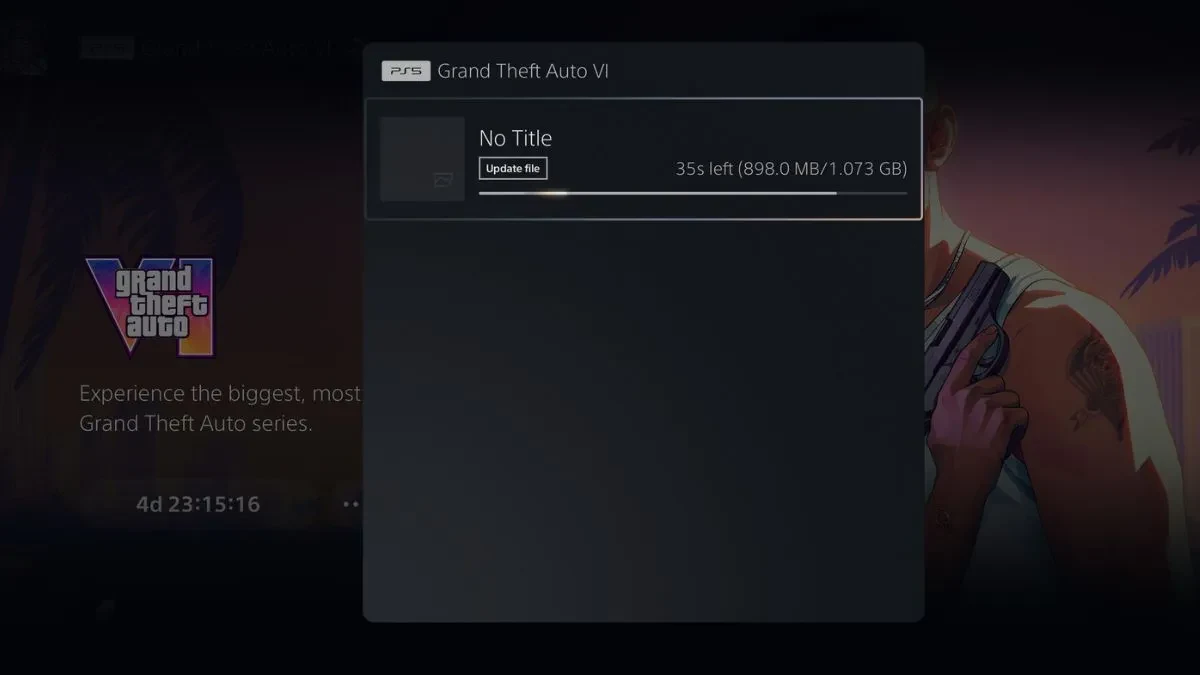 If yours is missing, check your download queue first. Turning on automatic updates lets the file download without you having to check.
Some reports say the update must be installed before you can play on launch day. Rockstar hasn't confirmed that, so treat it as reported rather than official. If the requirement is real, having the update in place before launch saves a wait.
Neither update came with official patch notes, so what each one changes isn't known. For the version numbers and file sizes of both, see the full list of GTA 6 update versions and sizes.
How to Fix a GTA 6 Download That Won't Start on PS5
PlayStation's troubleshooting steps for the game work in this order. Move to the next step only if the download still fails.
- Go to Downloads/Uploads in the control centre, select the GTA VI download, choose Pause, then select Resume.
- If it still fails, select the download and choose Cancel and Delete. Go to your Game Library, find GTA VI and try again.
- Check PlayStation's status page. If there's an alert, wait until the service is running again before you retry.
- Make sure the latest system software is installed. Go to Settings > System > System Software > System Software Update and Settings.
- Check that you have enough free space. Select the game in your Game Library, open its More menu and choose View Product to see the required space. Then go to Settings > Storage to check what you have free. For more on how much room the install takes, see how much storage you need for GTA 6.
- If the download still fails, start your PS5 in Safe Mode and select Clear Cache and Rebuild Database. Don't select any reset option.
The Safe Mode step rebuilds the console's database of installed content, and PlayStation points to it for downloads that keep failing. The system software step is a general check rather than a GTA-specific fix. Recent PS5 system software updates are listed as security fixes and don't mention GTA 6, but an up-to-date system is still one of PlayStation's requirements for playing.
What to Check If the Game Won't Launch on PS5
Most launch problems come down to the account or the console setup. PlayStation's checklist for playing GTA VI asks you to confirm these first:
- You're signed in to the account used to pre-order the game or to enter the physical code.
- Your PS5 is connected to the internet.
- You have enough storage space.
- Your system software is up to date.
If you're signed in to an account that doesn't own the game, the account that owns it has to turn on Console Sharing and Offline Play on this PS5. Go to Settings > Users and Accounts > Other > Console Sharing and Offline Play, then select Enable.
If the game still won't launch, restore its license. Go to Settings > Users and Accounts > Other > Restore Licences, select the license you want and restore it. You can also select the game from the home screen or your library, press the Options button and choose Restore Licence. If the console itself is the problem, PlayStation directs hardware issues to PlayStation Repairs.
Frame-Rate Dips and Other Minor Glitches
GTA 6 is aimed at 30 frames per second on PS5, including PS5 Pro, and on Xbox Series X/S at launch, with no separate performance mode. Reports tie the frame-rate dips to the standard PS5, where the game rarely holds a steady 30 FPS in busy areas. The park at Mount Kalaga and dense parts of Ocean Beach can drop into the 20s, and heavy action such as driving, shootouts and quick-cut sequences causes the same problem.
One report from a PS5 Pro describes smooth play over more than 100 hours, so the dips don't show up on every setup. Rockstar hasn't said anything about the dips, and no fix has been announced. Because the game has only one 30 FPS mode, there is no alternate mode to switch to.
A single report also describes a floating coffee cup at the safehouse that appeared when switching between Jason and Lucia. It's a minor visual glitch, and no fix has been reported. PlayStation's GTA VI support page directs questions about gameplay issues, patches and bugs to Rockstar Support.