Not directly, at least not in a way you can count on. On Xbox Series X|S, the places Microsoft supports for playing optimized games are the internal SSD and the Storage Expansion Card, and USB works for storage and transfer. On PS5, a USB drive can hold GTA 6 for storage, but the game has to be copied back to internal storage or an M.2 SSD before you can play it.
| Storage option | Can you play GTA 6 from it? |
|---|---|
| Xbox internal SSD | Yes |
| Xbox Storage Expansion Card | Yes |
| Xbox USB drive | Not confirmed. Use it for storage and transfer |
| PS5 internal SSD | Yes |
| PS5 M.2 SSD (supported drive) | Yes |
| PS5 USB extended storage | No. Copy the game back to internal or M.2 storage first |
Can You Play GTA 6 From a USB Drive on Xbox Series X|S?
Under Microsoft's standard rule, no. The Xbox Store lists GTA 6 as optimized for Series X|S, and optimized games are meant to run from the internal SSD or the Storage Expansion Card. A USB 3.1 hard drive or SSD still has a job: it can hold optimized games so you can move them quickly to a place where they play.
Microsoft notes that a small number of optimized games can run from USB. GTA 6 hasn't been confirmed as one of them, so install it to the internal SSD or the Storage Expansion Card and use USB as a holding spot.
The reason comes down to speed. Microsoft designed the Storage Expansion Card to match the internal SSD, which is what lets optimized games run from it. A standard USB drive doesn't have that match, so Microsoft lists it for storing and transferring optimized games, not for playing them.
Storage Expansion Card on Xbox Series X|S: Direct Play Explained
The Storage Expansion Card is Microsoft's option for this job. It's a 1 TB card made with Seagate, and it plugs into the Storage Expansion port on the back of the console with no setup beyond that. Once it's connected:
- Games install to the card by default.
- Optimized games play straight from it.
- Xbox Series X and Series S both use the same card.
- You can move or copy games between the card and other storage.
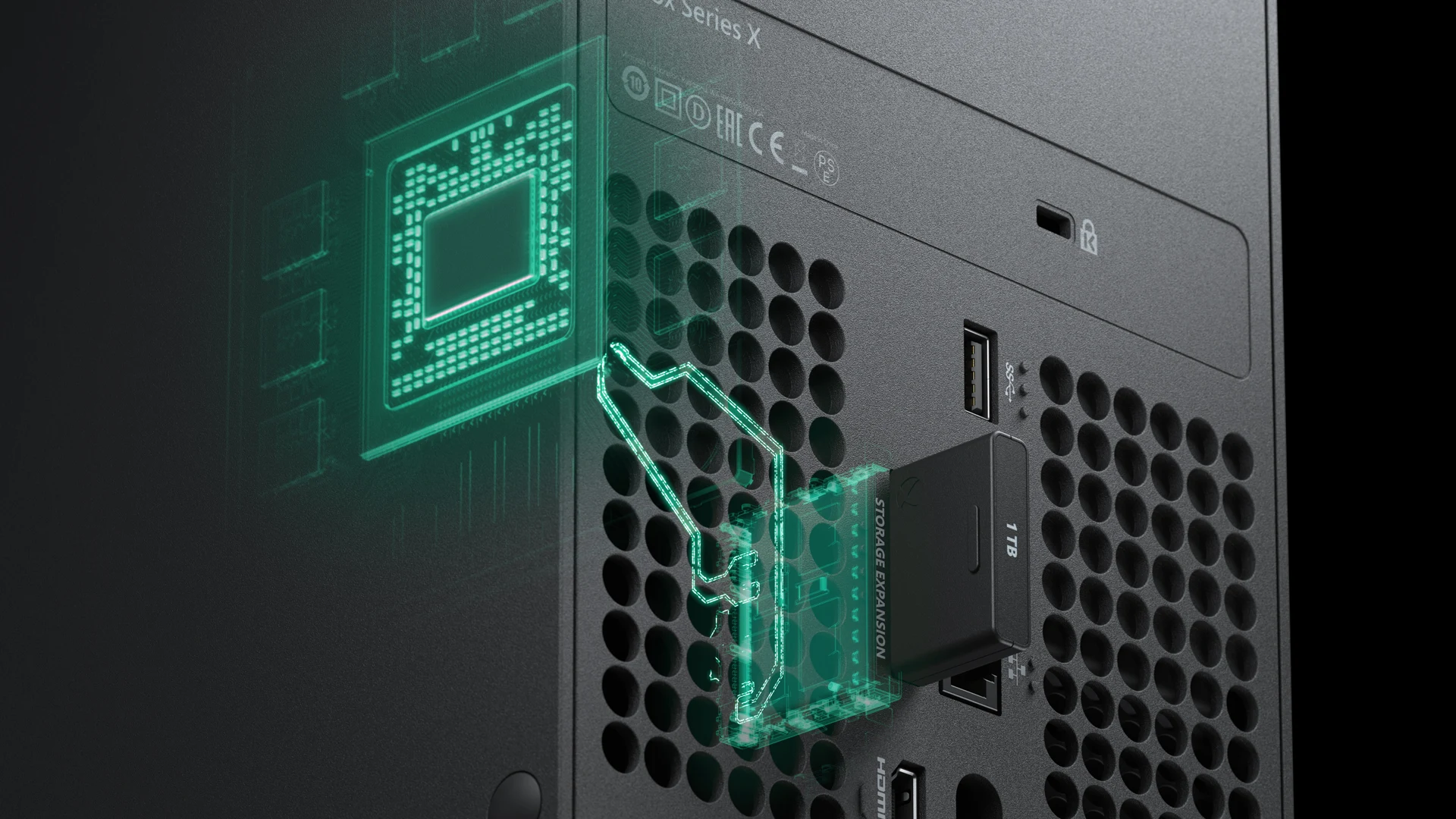
That's the main difference from USB. You can play a game from the card without copying it anywhere first, so it's the option to choose if you want a bigger library that's always ready to play.
Can You Play GTA 6 From a USB Drive on PS5?
Yes, a USB drive can hold GTA 6 on PS5, but only as storage. Sony calls this USB extended storage, and it's meant for keeping games you aren't playing right now. The game won't launch from the drive, so you'll need to move it to console storage or an M.2 SSD first.
The reason is that the console plays games from its internal storage or an M.2 SSD, which are the high-speed options. The USB drive holds games until you need them, which extends the space you have for your library. Sony sets a few requirements for the drive:
- A connection rated at SuperSpeed USB 5 Gbps or faster
- A capacity between 250 GB and 8 TB
- Connected directly to the console, not through a USB hub
- Only one USB extended storage drive connected at a time
Keep one more rule in mind: a game's data has to stay in one place. You can't split GTA 6 between internal storage, an M.2 SSD and a USB drive. PS4 games can run straight from a USB drive, but that doesn't extend to PS5 games like GTA 6.
M.2 SSD on PS5: Playing Games Without Copying Them Back
An M.2 SSD is the PS5 option that works like internal storage. Once it's installed, it can be used to download, copy, update and launch PS5 games. That means GTA 6 can run straight from the drive, and it's the better fit if you want more space without moving games around.
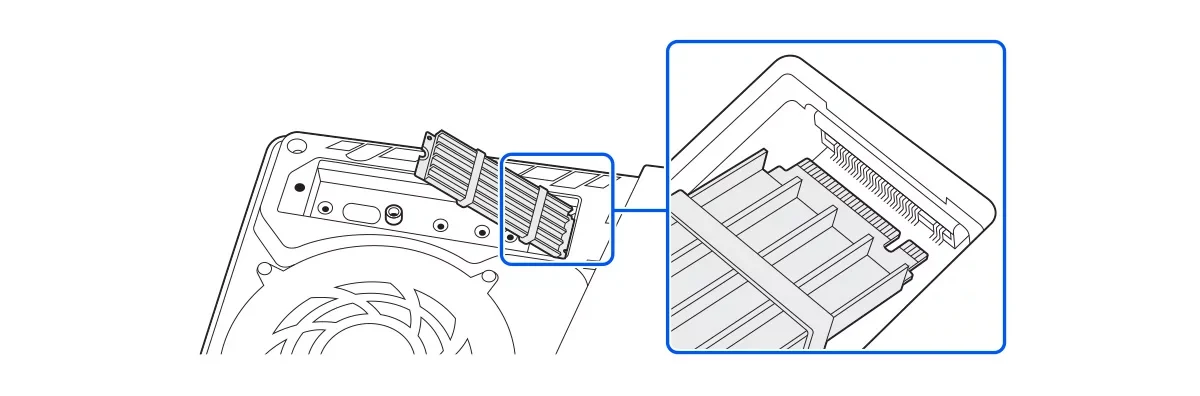
Before buying one, check that it meets Sony's requirements:
- A PCIe Gen4 x4 NVMe drive with an M key. SATA M.2 drives won't work.
- A capacity between 250 GB and 8 TB
- Effective heat dissipation, such as a heatsink and heat transfer sheet
- A sequential read speed of 5,500 MB/s or faster, which Sony recommends
Even with a drive that meets these specs, Sony can't guarantee it will work, and a faster drive may not perform exactly like the internal SSD. Fitting one means opening the console, so follow Sony's steps for your model closely.
To download GTA 6 straight to the drive, go to Settings > Storage > Installation Location and choose the M.2 SSD before you start. To move a game that's already on the console:
- Open Game Library from the games home screen.
- Highlight GTA 6, press the Options button and select Move Games and Apps.
- If a USB drive is also connected, open the Movable to M.2 SSD Storage tab, pick the game and choose Move.
You can check free space on the drive at Settings > Storage > M.2 SSD Storage. If GTA 6 has gameplay problems from the M.2 drive, pause any downloads or uploads first. If the problems continue, move the game to internal storage.
How Much Free Space GTA 6 Needs and How to Make Room
GTA 6 launches November 19, 2026, and Rockstar says it requires up to 212 GB of available space, depending on your device. That's the free space the console needs before the game can install, not the exact size of the game.
Microsoft's store catalog lists a different figure: a maximum download of 225,336,647,680 bytes. That's about 225 GB in standard gigabytes, or about 209.9 GiB in the binary units some systems use. It doesn't list an installed size, so the 212 GB figure is still the one to plan around.
If you're short on room, work through these steps:
- Check your free space. On PS5, go to Settings > Storage.
- Delete games, apps, screenshots and clips you no longer need.
- Move a game you're not playing to a USB drive, where it can wait until you're ready to play it again.
- For a bigger library that stays playable, add an M.2 SSD on PS5 or a Storage Expansion Card on Xbox.
- Keep at least 212 GB free before you download GTA 6.